Themes
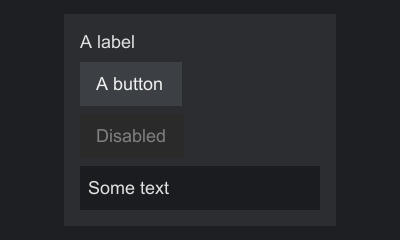
A theme decides how components look. It maps style keys, such as button.hovered, to paints, text styles, insets and metrics. Every component in one host shares the host's theme.
Built-in themes
| Theme | Where | Look |
|---|---|---|
Themes.flat() |
api |
Dark, solid colors only. Works on any engine without image assets. |
It defines every required key of every built-in control and most optional ones. The keys it leaves out, such as the padding keys, take the fallback each control documents, which the theme key reference lists. Adapters may ship themes of their own that use the engine's widget images.
Deriving a theme
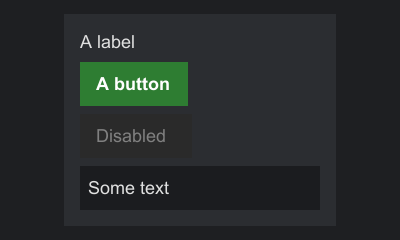
Themes are immutable. toBuilder() starts a builder holding all of a theme's keys, so a variant only lists what changes:
final Theme green = Themes.flat().toBuilder()
        .paint(Button.STYLE_NORMAL, Paint.solid(0xFF2E7D32))
        .paint(Button.STYLE_HOVERED, Paint.solid(0xFF388E3C))
        .paint(Button.STYLE_PRESSED, Paint.solid(0xFF1B5E20))
        .textStyle(Button.STYLE_TEXT, TextStyle.DEFAULT.withColor(0xFFFFFFFF).withBold(true))
        .build();
A theme from scratch
Theme.builder(name) starts an empty Theme.Builder. The name appears in error messages. paint, textStyle, insets and metric set a key's value, replacing any value the builder already holds for it, and build() makes the theme. A builder can go on to make more themes after build(), and none of them changes when it does.
final Theme light = Theme.builder("light")
        // Required by Button
        .paint(Button.STYLE_NORMAL, Paint.gradient(0xFFFFFFFF, 0xFFE0E0E0))
        .paint(Button.STYLE_HOVERED, Paint.gradient(0xFFFFFFFF, 0xFFD0E4FF))
        .paint(Button.STYLE_PRESSED, Paint.solid(0xFFC0D4F0))
        .paint(Button.STYLE_DISABLED, Paint.solid(0xFFEEEEEE))
        // Required by TextBox
        .paint(TextBox.STYLE_NORMAL, Paint.solid(0xFFFFFFFF))
        .paint(TextBox.STYLE_FOCUSED, Paint.solid(0xFFF4F8FF))
        .paint(TextBox.STYLE_DISABLED, Paint.solid(0xFFEEEEEE))
        // Optional keys
        .paint(Button.STYLE_FOCUS, Paint.solid(0xFF3B78E7))
        .textStyle(Button.STYLE_TEXT, TextStyle.DEFAULT.withColor(0xFF202020))
        .textStyle(Button.STYLE_TEXT_DISABLED, TextStyle.DEFAULT.withColor(0xFF9E9E9E))
        .textStyle(Label.STYLE_TEXT, TextStyle.DEFAULT.withColor(0xFF202020))
        .textStyle(TextBox.STYLE_TEXT, TextStyle.DEFAULT.withColor(0xFF202020))
        .paint(TextBox.STYLE_CARET, Paint.solid(0xFF202020))
        .build();
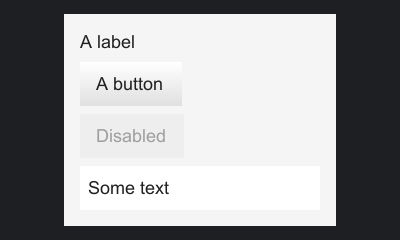
Labels and panels have no backgrounds in any theme. Give a panel one with setBackground, and put a label in a panel to give it one.
Required and optional keys
Each control lists the keys it reads as STYLE_* constants on its interface. Some are required, and the rest are optional with a documented fallback. The theme key reference lists them all.
A host checks the theme before it shows anything. When it opens a screen, it collects the required keys of every component in the tree, and if the theme lacks any of them it throws a ThemeException that lists every missing key at once, so one run shows everything to add. The same check runs when a component is added to a tree that is already on screen, and when the host's theme changes.
try {
    // The settings screen has a button and a text box, whose required keys an empty theme lacks
    SwingSnapshot.render(new SettingsScreen(), Theme.builder("empty").build(), 320, 200, 1f);
} catch (final ThemeException e) {
    // "Theme 'empty' is missing style keys: ...", naming every key the button and the text box require
    System.out.println(e.getMessage());
    final java.util.Set<String> keys = e.missingKeys();
}
ThemeException is also what a theme named by id throws when it cannot be built at all, such as an id that nothing defines or parents that form a cycle. Its missingKeys() is then empty.
Your own components declare required keys through requiredStyleKeys(). Remember to add them to the theme you use, as the switch example does.
A key may have a paint, a text style, insets, a metric, or any mix; has(key) is true for any of them. Look keys up with paint(key), textStyle(key) and insets(key), which return Optional, or with paintOr, textStyleOr and insetsOr, which take a fallback. metric(key) returns an OptionalDouble, and metricOr takes a fallback.
Paints
A Paint fills a rectangle. There are six kinds:
| Factory | Record | Draws |
|---|---|---|
Paint.solid(argb) |
Paint.Solid |
One color |
Paint.rounded(argb, radius) |
Paint.Rounded |
One color, with rounded corners |
Paint.gradient(top, bottom) |
Paint.Gradient |
A vertical gradient |
Paint.sprite(id) |
Paint.Sprite |
An image stretched over the rectangle |
Paint.tiled(id, size) |
Paint.Tiled |
An image repeated from the top left corner, one copy per size |
Paint.nineSlice(id, border), Paint.nineSlice(id, size, border), Paint.tiledNineSlice(id, size, border) |
Paint.NineSlice |
An image cut into a 3 by 3 grid |
Paint.NONE draws nothing; it is the default background. The sprite factories make untinted paints. To tint, use the record constructor with an ARGB tint, which is multiplied with the image's pixels: new Paint.NineSlice(id, border, 0xFFC0C0C0) darkens it slightly. Opaque white leaves an image unchanged.
paint.paint(painter, rect) draws any paint, so custom components need not care which kind they hold. Paint is a sealed interface of the six records, so code that does need the kind, such as a component that draws a solid paint's color a shade darker, can switch over them.
Colors
Colors are ARGB ints, 0xAARRGGBB. The alpha byte comes first: 0xFF000000 is opaque black, and 0x80FFFFFF is half-transparent white.
A color with alpha 0 draws nothing, so be careful with 0xRRGGBB literals: 0xFF0000 has alpha 0 and is invisible. Write 0xFFFF0000 for opaque red.
Rounded corners
Paint.rounded(argb, radius) fills the rectangle with rounded corners. A radius of 0 is a solid color, and one larger than half the shorter side counts as half of it. In a theme file it is a color object with a radius: { "color": "#FF202024", "radius": 4 }. A color object without a radius is a solid color, and a radius that is not a plain, non-negative number makes the file invalid.
// A solid color drawn with rounded corners, 4 units in radius
final Theme theme = Themes.flat().toBuilder()
        .paint(Window.STYLE_BACKGROUND, Paint.rounded(0xFF202024, 4f))
        .build();
The corners are drawn with the painter's shape calls, so on an engine that draws only rectangles they look stepped. See Lines, shapes and pixels and Platform differences.
Frosted glass
Paint.backdrop(blur, tint, radius) blurs what lies behind the area, puts the tint over it and rounds the corners, so a panel looks like glass over the scene behind the screens. The engine blurs a backdrop image the application gives it, on Swing with StrataPanel.setBackdrop and on Vulkan with StrataVulkan.setBackdrop. Without one, on an engine that cannot blur such as Minecraft, and with a blur of 0, the panel draws its tint as a rounded rectangle, so choose a tint that reads on its own too. In a theme file a backdrop is an object with a blur in UI units and an optional tint, transparent by default, and radius:
Sprites
A SpriteId names an image as namespace:path:
// assets/examplemod/sprites/button.png, with a 4-pixel frame
final SpriteId button = SpriteId.of("examplemod", "button");
final SpriteId buttonHover = SpriteId.parse("examplemod:button_hover");
final Theme textured = Themes.flat().toBuilder()
        .paint(Button.STYLE_NORMAL, Paint.nineSlice(button, Insets.of(4f)))
        .paint(Button.STYLE_HOVERED, Paint.nineSlice(buttonHover, Insets.of(4f)))
        .paint(Button.STYLE_PRESSED, new Paint.NineSlice(buttonHover, Insets.of(4f), 0xFFC0C0C0))
        .build();
Each adapter decides where the image comes from. The Swing adapter reads it from the classpath, by default at:
A SpriteResolver given to SwingSprites maps ids to any other layout. A missing image draws as magenta.
SpriteId.parse("examplemod:button") parses the text form. A missing namespace is an error, so a sprite never lands in another namespace by accident.
Nine-slices
A nine-slice keeps its corners at their size, stretches its edges along one axis and its center both ways, so one small image can frame a rectangle of any size. With Paint.nineSlice(id, border), border gives the width of each fixed edge in the image's pixels, and the image draws at one pixel per unit.
Give a size to say how many units the whole image stands for. border is then in those units, so an image with twice the pixels draws the same frame, only sharper. Paint.tiledNineSlice also repeats the edges and the center at their size instead of stretching them, and crops the last copy. Paint.tiled repeats a whole image the same way:
// A 400 by 40 image that stands for 200 by 20 units, with a 4-unit frame
final SpriteId button = SpriteId.of("examplemod", "button");
final SpriteId pattern = SpriteId.of("examplemod", "pattern");
final Theme sized = Themes.flat().toBuilder()
        .paint(Button.STYLE_NORMAL, Paint.nineSlice(button, new Size(200, 20), Insets.of(4f)))
        // Edges and center repeat at their size instead of stretching
        .paint(Button.STYLE_HOVERED, Paint.tiledNineSlice(button, new Size(200, 20), Insets.of(4f)))
        // One copy every 16 units, the last row and column cropped
        .paint(Button.STYLE_PRESSED, Paint.tiled(pattern, new Size(16, 16)))
        .build();
When a rectangle is smaller than the borders, they shrink in proportion. The borders must fit in the size, and a tiled nine-slice needs one. Strata draws sized and tiled paints itself, from pieces of the image, on every engine except one that stores slicing with its images, which uses its own. Keep the two in agreement so every engine draws the same.
Text styles
A TextStyle sets color, bold, italic, underline, strikethrough, a shadow, the monospaced font, a font family and a size. Themes map text keys to styles; labels can also take one directly. See Text.
Changing part of a text style
A TextStyle in an override or a theme replaces the whole style for its key. To change one property and keep the rest of what the engine's theme gives that key, override with a TextStylePatch instead. A patch names only the properties it changes: TextStylePatch.of() changes nothing, and color, bold, italic, underline, strikethrough, shadow, monospace, font and size return a copy that also sets one property.
// The color changes. Bold, the shadow and the other properties stay as the engine's theme has them.
final ThemeRef gold = ThemeRef.platform()
        .override(Label.STYLE_TEXT, TextStylePatch.of().color(0xFFE0C060));
ThemeRef.override(key, patch) and ThemeOverrides.with(key, patch) take them, as override(key, style) does for whole styles. A layer applies its whole styles first and then its patches, over the style the layers below give the key, or over TextStyle.DEFAULT when they give none. Two patches of one key in the same overrides combine, the later one winning where both set a property, so a recolor and a bold do not drop one another:
// Both apply: gold, and bold. Where the patches set the same property, the later one wins.
final ThemeOverrides overrides = ThemeOverrides.of()
        .with(Label.STYLE_TEXT, TextStylePatch.of().color(0xFFE0C060))
        .with(Label.STYLE_TEXT, TextStylePatch.of().bold(true));
A theme file's text entry already works this way: it changes only the fields it names. TextStylePatch.then(after) combines two patches in code, and apply(base) returns the patched style. A panel can patch the text inside it with Container.setTextStyle; see Inherited text styles.
Insets
Paints and text styles say what a control looks like. Insets, the third kind of theme value, say where it puts its content, in UI units. A tab bar reads tab.padding for the space around an unselected tab's text and tab.padding.selected for the selected tab's, so a theme whose unselected tab image is drawn shorter than the tab can move that tab's text down to match:
Theme theme = Themes.flat().toBuilder()
        .insets(TabBar.STYLE_PADDING, new Insets(8, 5, 8, 2))
        .build();
Most controls that put text or an icon inside a face have a padding key, such as button.padding, textbox.padding, list.cell.padding, menu.item.padding, window.padding and tooltip.padding. Each one's default is the control's built-in padding, so a theme sets only the ones it needs. Controls whose height is a line of text are that line plus the padding's top and bottom, so a theme can make its buttons and fields as tall as its engine's widgets:
Theme theme = Themes.flat().toBuilder()
        .insets(Button.STYLE_PADDING, new Insets(8, 6, 8, 5))
        .insets(TextBox.STYLE_PADDING, new Insets(4, 6, 4, 5))
        .build();
Padding set in code wins over the theme: setTextPadding on a button, a drop-down button, a text box, a password box or a text area, setPadding on a window, and setMargin on a cell label. To follow the theme again, call clearTextPadding() or clearPadding(). The setters take no null; clearPadding() is on every container, and clearTextPadding() on those controls.
theme.insets(key) and insetsOr(key, fallback) look them up, and ThemeRef.override(key, insets) overrides them like paints. A control that reads insets for several states sizes itself for the largest, so selecting a tab never moves its neighbors. Theme keys lists the insets keys with their defaults.
Metrics
Some things a theme tunes are a single number, such as how long the pointer rests before a tooltip shows or how many rows a wheel notch scrolls. Metrics, the fourth kind of theme value, hold one number per key. Each key's Javadoc states its unit, which is UI units, milliseconds, rows, or a flag that is on for any value but 0. Theme keys has a column for the unit.
Theme theme = Themes.flat().toBuilder()
        .metric(Tooltip.STYLE_DELAY, 250)
        .metric(ListView.STYLE_SCROLL_ROWS, 3)
        .build();
metric refuses a value that is not finite with an IllegalArgumentException. Every metric key the built-in controls read has a default in code, the control's built-in behavior, and Themes.flat() sets none of them. theme.metric(key) returns an OptionalDouble, metricOr(key, fallback) a float, and metrics() every metric the theme sets. ThemeRef.override(key, value) and ThemeOverrides.with(key, value) set one the way they set paints:
Theme keys lists every metric key with its default.
Flags and durations
A flag and a duration are metrics that say what they are. In a theme file, a flag is true or false, stored as 1 and 0, and a duration is a string of digits with an optional fraction and the unit ms or s, such as "500ms" or "0.5s", stored in milliseconds. Anything else, including a number that does not fit a float, makes the file invalid. In code, ThemeOverrides.with(key, boolean) and ThemeRef.override(key, boolean) set a flag. Read them back with Theme.flagOr(key, fallback), true when the metric is not 0, and Theme.millisOr(key, fallback), the metric rounded to whole milliseconds:
// A flag is stored as 1 or 0, a duration in milliseconds
final ThemeRef ref = ThemeRef.platform()
        .override(Tooltip.STYLE_BELOW, true)
        .override(Tooltip.STYLE_DELAY, 250);
final boolean below = theme.flagOr(Tooltip.STYLE_BELOW, false);
final long delay = theme.millisOr(Tooltip.STYLE_DELAY, 500);
A plain number still works for both, so a file written before these forms keeps its meaning.
Per-component overrides
Backgrounds and borders of containers, and the text styles of labels, can be set per component, outside the theme:
// Backgrounds and label styles can be set per component, outside the theme
final StackPanel card = factory.stackPanel().setPadding(6);
card.setBackground(Paint.gradient(0xFF3A3D43, 0xFF2B2D31));
// A one-unit frame inside the card's edges
card.setBorder(Border.of(0xFF5A5E66, 1f));
card.add(factory.label("Warning").setStyle(TextStyle.DEFAULT.withColor(0xFFFFB74D).withBold(true)));
A Border is a set of solid lines along the inside of a container's edges, in one color, each side with its own width, so a panel can have a border on every side but the bottom. Border.of(argb, width) makes one of the same width all around, and new Border(argb, insets) one with a width per side. The default is Border.NONE.
There is no per-component theme or per-subtree theme. To give one button a different face, cancel its Component.PAINT and draw something else, or write a component that reads its own keys.
Themes by id
A Theme built in code is fixed. To let users restyle your screens with packs, name the theme by id instead and hand the host a ThemeRef:
ThemeRef theme = ThemeRef.of(ThemeId.of("mymod", "shop"))
        .override(Button.STYLE_NORMAL, Paint.solid(0xFF2E7D32));
The host resolves the ref when it opens. Themes.FLAT (strata:flat) is registered on every engine, adapters register their engine themes under ids of their own, and code can define more. An id with nothing registered is defined by its files alone and names its starting theme as parent. An id that nothing registers, defines or has files for cannot resolve, and the host throws ThemeException when it opens.
The platform's default theme
Each platform has a default theme, the one screens open in when no theme is given. ThemeRef.platform() refers to it, so code can change a few keys of the engine's look without naming the adapter's theme:
// Wherever the platform shows screens, in its default theme
Strata.screens().open(new ShoppingList());

// The default theme with one key changed, for this screen only
Strata.screens().open(new ShoppingList(), ThemeRef.platform()
        .override(Button.STYLE_NORMAL, Paint.solid(0xFF2E7D32)));
The ref's id is Themes.PLATFORM (strata:platform). The adapter names the default theme through its ThemeSource.defaultTheme(), which is strata:flat where the adapter names none; on Swing, SwingThemeSource.setDefaultTheme sets it. A ref to strata:platform resolves as that theme in full, then takes the overrides added for strata:platform with Strata.themes().override, then its own. Those overrides apply to whichever theme is the default, on top of the overrides added for that theme's own id. A theme file can name strata:platform as its parent. No theme files are read for strata:platform itself, and it cannot be defined in code.
When the engine reloads its assets, or code adds or closes overrides, every host with a ref resolves it again and keeps the ref's overrides. A result that lacks a key the open screen needs is logged and ignored, so the screen keeps its old theme.
Layers
A theme comes together from layers, lowest first. Each layer sets keys over the ones below it, so the last layer to set a key wins:
| Layer | What it holds | Name layer(key) reports |
|---|---|---|
| The base | The theme the adapter registers under the id, the adapter's base files, a theme defined in code, or the theme the id's files name as parent |
base for a theme built in code; a base file's own layer |
| Theme files | Every theme file the engine finds for the id, in the order the adapter gives them | The file's layer, usually its pack's id |
| Overrides from code | Keys set with Strata.themes().override, in the order they were added |
code |
| The ref's overrides | Keys set with ThemeRef.override |
ref |
A parent resolves in full, its own files and overrides included, before the child's layers go on top. When an id has a base, its files' parent is ignored, so a pack can change keys of an engine theme but cannot swap it for another theme. The adapter decides the order of the theme files, so it decides where the user's packs and each mod's files fall. Platform differences lists what Swing does.
A resolved theme remembers which layer set each key. theme.layer(key) returns the layer's name, which shows where a color or a sprite came from. A theme built with Theme.builder reports none, and neither does a variant made with toBuilder(). To look at a resolved theme outside a screen, resolve the ref yourself; on Swing, SwingThemeSource.resolve does it the way a host would:
// Resolve the flat theme with every theme file on the class path and every override from code
final SwingThemeSource source = new SwingThemeSource(ThemeExamples.class.getClassLoader());
final Theme resolved = source.resolve(ThemeRef.of(Themes.FLAT));

// "base" for Strata's own value, a jar's name for a pack's file, "code" for Strata.themes().override
final String layer = resolved.layer(Button.STYLE_NORMAL).orElse("none");
System.out.println(Button.STYLE_NORMAL + " was set by " + layer);
Overrides from code
ThemeRef.override changes a theme for one screen. To change it for every screen that uses it, or to define a theme of your own on top of another, use the ThemeRegistry from Strata.themes(). It works before any screen exists, and from any thread:
// Every screen that shows the flat theme gets green buttons, until the subscription is closed
final ThemeOverrides green = ThemeOverrides.of()
        .with(Button.STYLE_NORMAL, Paint.solid(0xFF2E7D32))
        .with(Button.STYLE_HOVERED, Paint.solid(0xFF388E3C));
final Subscription everywhere = Strata.themes().override(Themes.FLAT, green);

// A theme of your own that starts from another; packs can restyle it like any theme
final Subscription shop = Strata.themes().define(ThemeId.of("examplemod", "shop"), Themes.FLAT,
        ThemeOverrides.of().with(Window.STYLE_BACKGROUND, Paint.solid(0xF0101010)));

// The same overrides on one screen only
final ThemeRef oneScreen = ThemeRef.of(Themes.FLAT).override(green);
ThemeOverrides holds paints, text styles, insets and metrics by style key, with no id, so the same overrides can go to override, to define or to one ref. Overrides from code apply above every theme file, so your code has the last word over packs and over other projects' theme files, and only a ref's own overrides come after them. Overrides for one id apply in the order they were added.
Nothing is written to a theme or a file. The keys apply each time the theme resolves, and closing the subscription brings back whatever lies beneath them. A text style from code replaces the whole style for its key, where a theme file's text entry and a text style patch change only the fields they name.
define gives an id a base that starts from its parent, as a theme file with parent does, and packs can restyle a defined theme like any other. Defining an id that is already defined, until that definition's subscription is closed, throws ThemeException, and so does defining strata:flat or strata:platform. An id that the adapter already gives a base cannot be defined either; that shows when the theme resolves, which then throws ThemeException.
Theme files
A theme file sets only the keys it changes. Where the files live depends on the engine: Swing reads assets/<namespace>/themes/<path>.json from the class path. A file whose id has a base changes that theme key by key, and when several packs ship the same file, the one the adapter puts later wins per key.
{
  "parent": "strata:flat",
  "paints": {
    "button.normal": { "nine_slice": "mymod:button", "border": [3, 3, 3, 3] },
    "button.hovered": { "sprite": "mymod:button_hover", "tint": "#FFE0E0FF" },
    "button.focus": "none",
    "list.row": "#1F2024",
    "window.background": { "gradient": ["#F0101010", "#F0202020"] }
  },
  "text": {
    "button.text": { "color": "#FFFFFF", "shadow": true }
  },
  "insets": {
    "tab.padding": [8, 5, 8, 2]
  },
  "metrics": {
    "tooltip.delay": 250,
    "textbox.caret.underscore": 1
  }
}
| Value | Written as |
|---|---|
| Color | "#RRGGBB" (opaque) or "#AARRGGBB" |
| Rounded color | { "color": "#AARRGGBB", "radius": 4 } |
| No paint | "none" |
| Sprite | { "sprite": "ns:path" }, with an optional "tint" color |
| Nine-slice | { "nine_slice": "ns:path", "border": ... }, with an optional "tint", "size": [width, height] and "tiled": true, which needs a size. The border is one number, [horizontal, vertical] or [left, top, right, bottom] |
| Tiled sprite | { "tiled": "ns:path", "size": [width, height] }, with an optional "tint" |
| Gradient | { "gradient": [top, bottom] } |
| Text style | Any of color, bold, italic, underline, strikethrough, shadow, monospace, font and size. font is a font id such as "app:serif", or null for the platform's default font; size is a number of UI units, 0 for the default size, and never negative. Fields you leave out keep the style a lower layer gave the key, or TextStyle.DEFAULT where none did |
| Insets | One number, [horizontal, vertical] or [left, top, right, bottom], in UI units |
| Metric | A number, in the unit its key states. A flag may be true or false, and a duration a string such as "500ms" or "0.5s". |
A misspelled member, a bad color or broken JSON makes the whole file invalid. The engine logs it and skips that file, and the other packs still apply. Adapters find the files through the SPI's ThemeSource, which Writing an adapter describes.
Base files
An adapter can write its engine theme as JSON instead of building it in code. ThemeSource.bases(id) returns the files that make up the theme's base: the theme starts from the parent they name, applies them in order, and then applies the theme files and overrides as usual. A base file ships with the adapter, so a mistake in one is a bug: resolving throws ThemeException naming the file, where a broken pack file is only logged and skipped. An id cannot have both a base built in code and base files.
In Swing, SwingThemeSource.register(id, documents) registers base files. Keep them out of assets/<namespace>/themes, or they apply a second time as theme files.
Changing the theme at run time
The host owns the theme. Adapters can change it with ScreenHost.setTheme or ScreenStack.setTheme, which take either a Theme or a ThemeRef; components then re-read their keys in onApplyTheme and a new layout runs. See Screens.