Extending Strata
There are three ways to extend Strata. Pick the lightest one that does the job.
| Way | Use it to | Cost |
|---|---|---|
| Handle a built-in's events | Add drawing, change sizes, or filter, rewrite or veto what the user does to any control | A lambda |
| Compose | Package several components as one reusable piece | A plain class |
| Write a new component or layout | Make something that does not exist yet | A subclass of CustomComponent, CustomComposite or CustomContainer |
A subclass gets the same hooks Strata's own controls and panels are written with, so you can build anything they do. Strata's components and yours says how the two kinds differ.
Change a built-in through its events
Everything a control does goes through events, so most changes to a built-in need no new class, only a handler:
- To stop or change what the user does, handle the control's Pre event: cancel it, or set another value.
- To react, handle its Post event.
- To draw on top, handle
Component.PAINTED; to draw instead, cancelComponent.PAINT; to change the size it asks for, handleComponent.MEASURED.
Filter what a text box accepts, whether the user types or pastes:
// Typing, pasting and deleting all ask first, with the text the edit would produce
final TextBox amount = factory.textBox().onEvent(TextBox.EDIT, event -> {
    if (!event.value().chars().allMatch(Character::isDigit)) {
        event.cancel();
    }
});
Rewrite a value on its way in:
// The user cannot drag past the cap, but code can still set any value
final double[] cap = {0.8};
final Slider volume = factory.slider()
        .onEvent(Slider.CHANGE, event -> event.setValue(Math.min(event.value(), cap[0])));
Ask before a window closes. Calling window.close() from code fires no Closable.CLOSE, so the dialog can close it without asking again:
// Ask before closing a window with unsaved changes
final Window window = factory.window("Notes");
window.onEvent(Window.CLOSE, event -> {
    if (!unsaved[0]) {
        return;
    }
    event.cancel();
    factory.overlays().dialog(factory.messageBox("Notes", "Discard your changes?", MessageBox.Buttons.YES_NO)
            .onEvent(MessageBox.ANSWERED, answer -> {
                if (MessageBox.Result.YES.equals(answer.value())) {
                    window.close();
                }
            }));
});
return window;
Draw on top of a button:
// The normal button, plus a dot in the corner while there is something new
final boolean[] unread = {true};
final Button inbox = factory.button("Inbox")
        .onEvent(Component.PAINTED, event -> {
            if (unread[0]) {
                final Rect bounds = event.bounds();
                event.painter().fill(new Rect(bounds.right() - 6f, bounds.y() + 2f, 4f, 4f), 0xFFE8A33D);
            }
        })
        .onEvent(Button.PRESSED, event -> unread[0] = false);
Change how big a label wants to be:
// A label that is never narrower than 80 units, whatever its text
final Label score = factory.label("0")
        .onEvent(Component.MEASURED, event -> event.setWidth(Math.max(80f, event.width())));
A handler you want on many controls is a plain field or method, so reuse costs nothing:
/** Lets through only text made of digits. Shared by every amount field. */
static final EventHandler<ValueRequestEvent<TextInput<?>, String>> DIGITS_ONLY = event -> {
    if (!event.value().chars().allMatch(Character::isDigit)) {
        event.cancel();
    }
};

static TextBox amountField(final ComponentFactory factory) {
    return factory.textBox().setMaxLength(6).onEvent(TextInput.EDIT, DIGITS_ONLY);
}
Each control lists its events with its theme keys in Controls, and every event type's Javadoc lists the input that fires it.
Compose built-ins
When the piece is just existing components arranged a certain way, you need no Strata base class at all. Build the parts in a container and hand out the container:
/**
 * A caption above a text box. Composition needs no Strata types of its own: build the parts in a container and
 * hand out the container.
 */
public static final class LabeledField {
    private final StackPanel root;
    private final TextBox field;

    public LabeledField(final ComponentFactory factory, final String caption) {
        this.field = factory.textBox();
        this.field.setAlignment(HorizontalAlignment.STRETCH, VerticalAlignment.TOP);
        this.root = factory.stackPanel().setSpacing(2).add(factory.label(caption)).add(this.field);
    }

    /** The component to add to a container. */
    public Component<?> component() {
        return this.root;
    }

    public String text() {
        return this.field.text();
    }
}
The class is not a Component, so you add field.component() rather than field. To make a composite that is a component itself, so it can be passed anywhere a component can, extend CustomComposite.
A composite of private parts
A CustomComposite holds child components the way a container does, but only the composite can reach them. It adds them with addChild, lays them out in measure and arrange as a layout does, and callers see one component. This counter is a label between two buttons:
import org.inspirenxe.strata.api.ComponentFactory;
import org.inspirenxe.strata.api.component.Component;
import org.inspirenxe.strata.api.control.button.Button;
import org.inspirenxe.strata.api.control.display.Label;
import org.inspirenxe.strata.api.event.EventType;
import org.inspirenxe.strata.api.event.control.ValueEvent;
import org.inspirenxe.strata.api.extension.ArrangeContext;
import org.inspirenxe.strata.api.extension.CustomComposite;
import org.inspirenxe.strata.api.extension.MeasureContext;
import org.inspirenxe.strata.api.geometry.Rect;
import org.inspirenxe.strata.api.geometry.Size;
import org.inspirenxe.strata.api.layout.HorizontalAlignment;
import org.inspirenxe.strata.api.layout.VerticalAlignment;

/**
 * A number between a minus and a plus button. The buttons and the label are private parts: callers see one
 * component, cannot rearrange its parts, and hear {@link #CHANGED} instead of the buttons' own events.
 */
public final class Counter extends CustomComposite<Counter> {
    /**
     * Reported after the count changes, by the buttons or by {@link #setCount}.
     */
    public static final EventType<ValueEvent<Counter, Integer>> CHANGED =
            EventType.valueReport("examplemod.counter.changed");

    private static final float GAP = 2f;

    private final Label value;
    private int count;

    public Counter(final ComponentFactory factory) {
        super(factory);
        this.value = factory.label("0");
        this.value.setMinSize(24f, 0f);
        this.value.setAlignment(HorizontalAlignment.CENTER, VerticalAlignment.MIDDLE);
        // Button.PRESSED from these parts stops here, so a handler outside never sees which button it was
        this.addChild(factory.button("-").onEvent(Button.PRESSED, event -> this.setCount(this.count - 1)));
        this.addChild(this.value);
        this.addChild(factory.button("+").onEvent(Button.PRESSED, event -> this.setCount(this.count + 1)));
    }

    public int count() {
        return this.count;
    }

    public Counter setCount(final int count) {
        if (count != this.count) {
            final int previous = this.count;
            this.count = count;
            // New label text schedules a layout by itself
            this.value.setText(Integer.toString(count));
            this.report(CHANGED, count, previous);
        }
        return this.self();
    }

    @Override
    protected Size measure(final MeasureContext context, final float availableWidth, final float availableHeight) {
        // A row of the three parts: widths add up, the tallest sets the height
        float width = 0f;
        float height = 0f;
        for (final Component<?> part : this.childList()) {
            final Size outer = context.measure(part, Float.POSITIVE_INFINITY, availableHeight);
            width += outer.width();
            height = Math.max(height, outer.height());
        }
        return new Size(width + GAP * (this.childList().size() - 1), height);
    }

    @Override
    protected void arrange(final ArrangeContext context, final Rect bounds) {
        // Each part gets the full height, and its own alignment places it inside
        float x = bounds.x();
        for (final Component<?> part : this.childList()) {
            final Size outer = context.outerSize(part);
            context.arrange(part, new Rect(x, bounds.y(), outer.width(), bounds.height()));
            x += outer.width() + GAP;
        }
    }
}
The control events of parts added with addChild, such as the buttons' Button.PRESSED, stop at the composite, so nothing outside hears them. The composite reports what the outside should hear with an event type of its own, here Counter.CHANGED, which bubbles like any other:
final Label total = factory.label("Total: 0");
final Counter apples = new Counter(factory);
final Counter pears = new Counter(factory).setCount(2);
// One handler on the row hears both counters, and never the buttons inside them
final StackPanel row = factory.stackPanel(Orientation.HORIZONTAL).setSpacing(8)
        .add(apples)
        .add(pears)
        .add(total)
        .onEvent(Counter.CHANGED, event -> total.setText("Total: " + (apples.count() + pears.count())));
A part that shows the caller's content, such as a cell a caller's cell factory made, goes in with addContent instead. It is still private, but control events from it and from anything inside it pass the composite, so a button in a cell is heard around the composite. CustomComposite also has removeChild, clearChildren, childList() and the ordering methods below, and setChildClipping(false) lets parts draw outside its bounds. There is no clipsChildren() to override: the setting is yours to make, and a CustomContainer reports it through its public clipsChildren(). CustomContainer is a composite whose children are public: callers add and remove them through the Container methods.
Write a new component
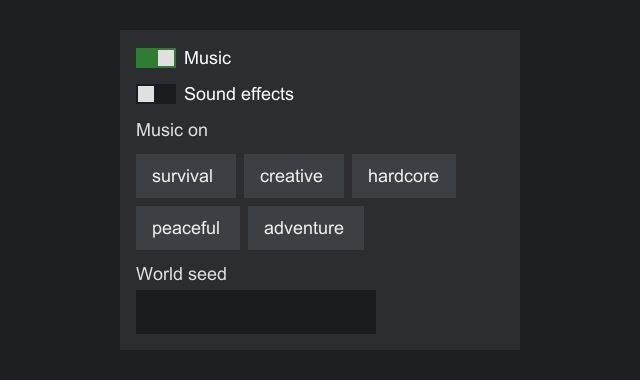
Subclass CustomComponent<T>. To let other code see your component as a type of its own, declare an interface that extends Component<YourInterface> and implement it. This example builds a small switch that works much like Strata's own ToggleSwitch.
import org.inspirenxe.strata.api.component.Component;
import org.inspirenxe.strata.api.component.Focusable;
import org.inspirenxe.strata.api.component.HasCursor;
import org.inspirenxe.strata.api.component.HasTooltip;
import org.inspirenxe.strata.api.event.EventType;
import org.inspirenxe.strata.api.event.control.ValueEvent;
import org.inspirenxe.strata.api.event.control.ValueRequestEvent;
import org.inspirenxe.strata.api.state.PropertyKey;

/**
 * An on/off switch with a caption to its right: a track with a knob that sits left when off and right when on.
 */
public interface ToggleSwitch extends Component<ToggleSwitch>, Focusable<ToggleSwitch>, HasCursor<ToggleSwitch>,
        HasTooltip<ToggleSwitch> {
    /** Style key for the track when off (paint, required). */
    String STYLE_TRACK = "examplemod.switch.track";
    /** Style key for the track when on (paint, required). */
    String STYLE_TRACK_ON = "examplemod.switch.track.on";
    /** Style key for the knob (paint, required). */
    String STYLE_KNOB = "examplemod.switch.knob";
    /** Style key for the caption (text style, optional). */
    String STYLE_TEXT = "examplemod.switch.text";

    /** Asked when the user flips the switch, with the state it is about to take. */
    EventType<ValueRequestEvent<ToggleSwitch, Boolean>> TOGGLE = EventType.valueRequest("examplemod.switch.toggle");
    /** Told after the switch changed, whether the user or code changed it. */
    EventType<ValueEvent<ToggleSwitch, Boolean>> TOGGLED = EventType.valueReport("examplemod.switch.toggled");
    // So it can be bound: how to read and write the property, and the report that tells of a change
    PropertyKey<ToggleSwitch, Boolean> ON = PropertyKey.of("examplemod.switch.on", ToggleSwitch::isOn,
            ToggleSwitch::setOn, TOGGLED);

    boolean isOn();

    ToggleSwitch setOn(boolean on);

    /**
     * What a snapshot records about a switch.
     *
     * @param on whether it was on
     * @param text its caption
     */
    record State(boolean on, String text) {
    }
}
import org.inspirenxe.strata.api.ComponentFactory;
import org.inspirenxe.strata.api.component.CursorKind;
import org.inspirenxe.strata.api.event.input.KeyEvent;
import org.inspirenxe.strata.api.event.input.PointerButtonEvent;
import org.inspirenxe.strata.api.extension.CustomComponent;
import org.inspirenxe.strata.api.extension.MeasureContext;
import org.inspirenxe.strata.api.extension.Painter;
import org.inspirenxe.strata.api.geometry.Rect;
import org.inspirenxe.strata.api.geometry.Size;
import org.inspirenxe.strata.api.input.Key;
import org.inspirenxe.strata.api.input.KeyAction;
import org.inspirenxe.strata.api.input.MouseButton;
import org.inspirenxe.strata.api.text.TextSpan;
import org.inspirenxe.strata.api.text.TextStyle;
import org.inspirenxe.strata.api.theme.Paint;
import org.inspirenxe.strata.api.theme.Theme;

import java.util.Objects;
import java.util.Set;

/**
 * The switch implementation. Other code sees only {@link ToggleSwitch}.
 */
public final class ToggleSwitchImpl extends CustomComponent<ToggleSwitch> implements ToggleSwitch {
    private static final float TRACK_WIDTH = 20f;
    private static final float TRACK_HEIGHT = 10f;
    private static final float KNOB = 8f;
    private static final float GAP = 4f;

    private final String text;
    private boolean on;

    // Read from the theme in onApplyTheme
    private Paint track;
    private Paint trackOn;
    private Paint knob;
    private TextStyle textStyle;

    // Cached during measure, used during paint
    private TextSpan span;
    private float lineHeight;

    public ToggleSwitchImpl(final ComponentFactory factory, final String text) {
        super(factory);
        this.text = Objects.requireNonNull(text, "text");
        this.track = Paint.NONE;
        this.trackOn = Paint.NONE;
        this.knob = Paint.NONE;
        this.textStyle = TextStyle.DEFAULT;
        this.span = new TextSpan(text, this.textStyle);
        // Declaring Focusable made it focusable and tabbable already; HasCursor makes this cursor take effect
        this.setCursor(CursorKind.HAND);
    }

    @Override
    public boolean isOn() {
        return this.on;
    }

    @Override
    public ToggleSwitch setOn(final boolean on) {
        if (this.on != on) {
            this.on = on;
            // Being on does not change the size, so no invalidateLayout() here.
            // Report every change, from the user or from code.
            this.report(TOGGLED, on, !on);
        }
        return this.self();
    }

    /**
     * Flips the switch for the user: asks first, then applies whatever value the handlers left.
     */
    private void userToggle() {
        this.request(TOGGLE, !this.on, this::setOn);
    }

    // Theme

    @Override
    protected Set<String> requiredStyleKeys() {
        return Set.of(STYLE_TRACK, STYLE_TRACK_ON, STYLE_KNOB);
    }

    @Override
    protected void onApplyTheme(final Theme theme) {
        this.track = theme.paintOr(STYLE_TRACK, Paint.NONE);
        this.trackOn = theme.paintOr(STYLE_TRACK_ON, Paint.NONE);
        this.knob = theme.paintOr(STYLE_KNOB, Paint.NONE);
        // Optional keys get a fallback instead of being required
        this.textStyle = theme.textStyleOr(STYLE_TEXT, TextStyle.DEFAULT);
    }

    // Layout and drawing

    @Override
    protected Size measure(final MeasureContext context, final float availableWidth, final float availableHeight) {
        this.span = new TextSpan(this.text, this.textStyle);
        this.lineHeight = context.text().lineHeight(this.textStyle);
        final float textWidth = context.text().width(this.span);
        return new Size(TRACK_WIDTH + GAP + textWidth, Math.max(TRACK_HEIGHT, this.lineHeight));
    }

    @Override
    protected void paint(final Painter painter, final Rect bounds) {
        final float middle = bounds.y() + bounds.height() / 2f;
        final Rect trackArea = new Rect(bounds.x(), middle - TRACK_HEIGHT / 2f, TRACK_WIDTH, TRACK_HEIGHT);
        (this.on ? this.trackOn : this.track).paint(painter, trackArea);

        final float knobX = this.on ? trackArea.right() - KNOB - 1f : trackArea.x() + 1f;
        this.knob.paint(painter, new Rect(knobX, trackArea.y() + 1f, KNOB, KNOB));

        painter.text(this.span, trackArea.right() + GAP, middle - this.lineHeight / 2f);
    }

    // Input

    @Override
    protected void onClick(final PointerButtonEvent event) {
        if (event.button() == MouseButton.LEFT) {
            this.userToggle();
            event.consume();
        }
    }

    @Override
    protected void onKey(final KeyEvent event) {
        if (event.action() == KeyAction.PRESS && event.key() == Key.SPACE) {
            this.userToggle();
            event.consume();
        }
    }

    // Snapshots

    @Override
    protected Object snapshotState() {
        return new State(this.on, this.text);
    }
}
Using it looks like using a built-in:
final ToggleSwitch music = new ToggleSwitchImpl(factory, "Music").setOn(true);
final ToggleSwitch sounds = new ToggleSwitchImpl(factory, "Sound effects");
final Label summary = factory.label("Music on");
music.onEvent(ToggleSwitch.TOGGLED, event -> summary.setText(event.value() ? "Music on" : "Music off"));

final WrapPanel tags = new WrapPanel(factory, 4);
for (final String tag : new String[] {"puzzle", "strategy", "co-op", "casual", "story"}) {
    tags.add(factory.button(tag));
}
tags.setAlignment(HorizontalAlignment.STRETCH, VerticalAlignment.TOP);

final StackPanel column = factory.stackPanel().setSpacing(6).setPadding(8)
        .add(music).add(sounds).add(summary).add(tags);
Its required keys must be in the theme:
// The host refuses a tree whose theme lacks a required key, so add your component's keys to the theme
return Themes.flat().toBuilder()
        .paint(ToggleSwitch.STYLE_TRACK, Paint.solid(0xFF1B1C1F))
        .paint(ToggleSwitch.STYLE_TRACK_ON, Paint.solid(0xFF2E7D32))
        .paint(ToggleSwitch.STYLE_KNOB, Paint.solid(0xFFE0E0E0))
        .build();
Events for your own control
Declare your control's events as constants on its interface, a Pre request for each change the user can make and a Post report for each change from any source, and fire them from the implementation:
/** Asked when the user flips the switch, with the state it is about to take. */
EventType<ValueRequestEvent<ToggleSwitch, Boolean>> TOGGLE = EventType.valueRequest("examplemod.switch.toggle");
/** Told after the switch changed, whether the user or code changed it. */
EventType<ValueEvent<ToggleSwitch, Boolean>> TOGGLED = EventType.valueReport("examplemod.switch.toggled");
// So it can be bound: how to read and write the property, and the report that tells of a change
PropertyKey<ToggleSwitch, Boolean> ON = PropertyKey.of("examplemod.switch.on", ToggleSwitch::isOn,
        ToggleSwitch::setOn, TOGGLED);
@Override
public ToggleSwitch setOn(final boolean on) {
    if (this.on != on) {
        this.on = on;
        // Being on does not change the size, so no invalidateLayout() here.
        // Report every change, from the user or from code.
        this.report(TOGGLED, on, !on);
    }
    return this.self();
}

/**
 * Flips the switch for the user: asks first, then applies whatever value the handlers left.
 */
private void userToggle() {
    this.request(TOGGLE, !this.on, this::setOn);
}
| Made with | Kind | Fire it with |
|---|---|---|
EventType.request(name) |
Pre, no value | request(type), which returns whether to go ahead |
EventType.valueRequest(name) |
Pre, with a value | request(type, value, apply), which calls apply with the final value unless canceled |
EventType.report(name) |
Post, no value | report(type) |
EventType.valueReport(name) |
Post, with a value | report(type, value, previous) |
Declare a PropertyKey beside the events for each property, as ON is above, and the control can be bound to a state like a built-in. Fire requests only for what the user does, and reports after every change, whoever made it, as the built-ins do. With no handler for a type on the path, request and report fire nothing and allocate nothing, and request(type, value, apply) just calls apply. isHandled(type) tells you whether anything listens, for work only an event needs. If your component is a CustomComposite, the events of the controls you add with addChild stop at it, so fire your own types for what the outside should hear. Events from content added with addContent pass through.
The hooks
Every hook is a protected method you override, and Strata calls each one at the time the table gives.
| Hook | Called | Default |
|---|---|---|
measure(context, availableWidth, availableHeight) |
During layout, when the component or something inside it changed, or it is offered a different size. Return the content's natural size. Required. | |
measureMinimum(context) |
During layout, the first time a parent that shares space asks after the component changed. Return the smallest size the content can work in, such as the longest word of wrapping text. A stack's weighted children and a grid's weighted tracks get no less. | Size.ZERO |
arrange(context, bounds) |
On a CustomComposite or CustomContainer, after measure, with the component's final bounds. Give every child its slot. Required there. |
|
paint(painter, bounds) |
Every frame, after the background and border and before a composite's children | Draws nothing |
paintOverChildren(painter, bounds) |
On a composite, every frame after its children, outside their clip | Draws nothing |
childClip() |
On a composite, while painting and hit testing, if it clips its children. Return a rectangle worked out during layout. | The bounds |
requiredStyleKeys() |
When the component joins a host, and when the theme changes | None |
onApplyTheme(theme) |
On attach and whenever the theme changes, before the next layout | Nothing |
onAttached() |
Every time the component joins a tree a host is showing, after onApplyTheme and the bindings, before its Component.ATTACHED handlers. See Attach and detach. |
Nothing |
onDetached() |
Every time it leaves such a tree, after its Component.DETACHED handlers and while its bindings still run |
Nothing |
baseline() |
During the parent's layout, after measure, if the parent lines up text. Return the distance from the top of the bounds to the first line's baseline. See Lining up text. |
NaN, for none |
acceptsTextInput() |
When it gains focus | false |
textInputKind() |
When it gains focus, if it accepts text input. Return SECRET for a secret, so the engine can turn off input methods and suggestions. |
TEXT |
snapshotState() |
When an event with snapshots captures it | null |
onPointerEnter, onPointerExit, onPointerMove, onPointerPress, onPointerRelease, onClick, onDragStart, onDrag, onDragEnd, onScroll, onKey, onChar |
The default-behavior step of the matching InputEvents type, after the component's handlers, unless one canceled it |
Nothing |
onDragEnter, onDragOver, onDragExit, onDrop, onTransferDone |
The same, for the five events of a drag that carries data. See Dragging data. | Nothing |
onFocusGained, onFocusLost |
The default-behavior step of Focusable.FOCUS_GAINED and FOCUS_LOST |
Nothing |
onOtherEvent(type, event) |
The default-behavior step of an input event type with no hook of its own, such as InputEvents.MODIFIERS_CHANGED on the screen's root. Control events, the requests and reports, have no default-behavior step. |
Nothing |
onChildRemoved(child) |
On a composite, after a child is removed. Drop what you kept about it. | Nothing |
onDescendantFocused(descendant) |
On a composite, after focus moves to a component inside it, innermost composite first | Nothing |
measure receives the space its parent offered with the margin already taken off. Where the component has a fixed width or height, that size is offered in place of the parent's, and the maximum size caps both. A component that did not change and is offered the same space as last time keeps its last size without measure running, so do not count frames or poll for changes in measure.
measureMinimum takes no space: return what the content needs wherever it is, and read children's minimums with context.minimumSize(child) rather than measuring them. Strata raises the result to the minimum size, caps it by the maximum size, puts a fixed size in its place, and keeps it until the next invalidateLayout(). It does not make the component itself larger: measure can still be offered less, inside a fixed size for example. A negative or non-finite result counts as zero.
When hooks run
A host does its work for a frame in this order, and only the steps something asked for do anything:
- A host given its theme as a
ThemeRefresolves it again if a theme file or an override in code changed. A screen that asked for a rebuild is built again, and bound properties are updated from their states. Expired toasts close, and a tooltip whose wait is over opens. - Layout: from the root down, each component that changed, or is offered a different size, is measured, then each one that was measured or given a different slot is arranged. Components that asked only to be arranged again, through
invalidateArrangement(), are arranged in their last slot. - Painting: for each component, its
Component.PAINThandlers run, then its background, border andpaint, then its children in drawing order, thenpaintOverChildren, then itsComponent.PAINTEDhandlers. CancelingPAINTskips the component's own drawing,paintOverChildrenincluded, but not its children.
Input arrives between frames. A pointer event runs the layout first if something changed, so hit testing never sees stale bounds. Then the event fires: on each component of its path, the handlers run and then the component's on... hook, unless a handler canceled it. onApplyTheme runs when a component is attached and when the theme changes, before the next layout.
Attach and detach
A component is attached when it is in a tree a host shows, and detached when it leaves one. Adding it to an attached container attaches it, removing it detaches it, and so do an expander showing or hiding its content, a navigation view swapping pages, an overlay opening or closing, and a screen opening, closing or being rebuilt. The same two steps run in every case:
- On attach, the host applies the theme (
onApplyTheme), sets the properties of the bindings that joined, and then callsonAttached()and firesComponent.ATTACHEDon each component, parents before their children. The component's hook runs before its handlers. - On detach, the host first fires
Component.DETACHEDand callsonDetached()on each component, children before their parents, while the tree is still attached and its bindings still run. The handlers run before the component's hook. Then focus, hover and the tooltip are cleared and the tree is detached.
Each attach a component hears is followed by exactly one detach. A throwing handler or hook does not stop the walk; the first exception is thrown at the end. The events are made only when a component has a handler for them, and they do not bubble. Events covers them from the handler's side.
Start what a component needs only while it is shown in onAttached() and stop it in onDetached(). This chart listens to a feed of prices only while it is on a screen:
/**
 * Something that pushes prices while anyone listens.
 */
public interface PriceFeed {
    Subscription subscribe(DoubleConsumer listener);
}

/**
 * A chart that listens to a feed only while it is shown.
 */
public static final class PriceChart extends CustomComponent<PriceChart> {
    private final PriceFeed feed;
    private Subscription subscription;
    private volatile double last;

    public PriceChart(final ComponentFactory factory, final PriceFeed feed) {
        super(factory);
        this.feed = feed;
    }

    @Override
    protected void onAttached() {
        // Runs every time the component joins a shown tree, after its theme and bindings are set
        this.subscription = this.feed.subscribe(price -> {
            this.last = price;
            // The feed may call from any thread, and repaint may be called from any thread
            this.repaint();
        });
    }

    @Override
    protected void onDetached() {
        // Runs every time it leaves, so a collapsed expander or a closed screen stops the feed
        if (this.subscription != null) {
            this.subscription.unsubscribe();
            this.subscription = null;
        }
    }

    public double last() {
        return this.last;
    }

    @Override
    protected Size measure(final MeasureContext context, final float availableWidth, final float availableHeight) {
        return new Size(120, 40);
    }

    @Override
    protected void paint(final Painter painter, final Rect bounds) {
        final float height = (float) Math.max(0, Math.min(1, this.last)) * bounds.height();
        painter.fill(new Rect(bounds.x(), bounds.bottom() - height, bounds.width(), height), 0xFF81C784);
    }
}
Code outside a component does the same with whileAttached(start), which calls the supplier at once if the component is attached, again on every attach, and closes the returned Subscription on every detach:
/**
 * A label that follows a feed while it is shown, without a class of its own.
 */
public static Label priceLabel(final ComponentFactory ui, final PriceFeed feed) {
    final Label label = ui.label("-");
    // Called now if the label is attached, on every attach, and closed on every detach
    return label.whileAttached(() -> feed.subscribe(price -> ui.uiThread().execute(
            () -> label.setText(String.format("%.2f", price)))));
}
Rules
- Pass the factory of the host that will show the component. A component cannot move between hosts.
measuremust be pure layout. Compute and return a size, and cache whatpaintneeds. Strata applies the minimum and any fixed size to what you return. The available size may be infinite, and a negative result counts as zero. Do not change other components or callinvalidateLayout()from it. A composite may add and remove its own children during layout, as a list adds the rows that scroll into view; that schedules one more layout.paintdraws inside the bounds it is given and must not change layout state. It runs every frame, so avoid allocating there. The painter is valid only during the call.- Call
invalidateLayout()whenever somethingmeasure,measureMinimumorbaselinereads changes. A change that onlypaintreads needsrepaint()instead, and a change the clock brings needsrepaintAfter(millis)orrepaintNextFrame(); see Asking for frames. - Read time, the clipboard and text sizes through
environment(), never fromSystem.currentTimeMillis()or AWT, so the component works on every engine and in tests. - Event hooks run only while the component is attached, and a hidden or disabled component gets no new pointer or keyboard input.
- Consume the events you act on, so ancestors and the engine do not act on them too.
- Everything runs on the UI thread, and a component that a host shows may be changed only there; see The UI thread.
repaint()is the exception. Exceptions thrown from hooks propagate to the engine's call into Strata.
Every Component method is final on CustomComponent and delegates to Strata's half of the component, its peer, so your component takes part in layout, focus, hit testing and events like any other. Return this.self() from your own setters to keep chaining typed.
CustomComponent also has the methods of Focusable, HasCursor and HasTooltip. They take effect once your interface extends the matching one, as ToggleSwitch does above, and Strata ignores them otherwise. Declaring Focusable makes the component focusable and tabbable from the start.
Helpers for your own code
These protected methods are for the subclass's own drawing, layout and input code:
| Method | Does |
|---|---|
self() |
Returns this as T, for returning from your own setters |
environment() |
The engine's text metrics, clock, clipboard and held modifiers; see The environment |
theme() |
The host's theme as an Optional, empty before the first attach, for reading styles outside onApplyTheme. It has the text style patches of the containers around the component applied. |
setStyleState(state, on), stylePaint(key, fallback), styleText(key, fallback) |
Name your own style states and look up the theme's paints and text styles for them; see Style states |
repaint(), repaintAfter(millis), repaintNextFrame() |
Ask the host for a frame; see Asking for frames |
isHovered() |
Whether the pointer is over this component itself, and not over a child |
isHoverWithin() |
Whether the pointer is over this component or anything inside it |
isPressed() |
Whether a button went down on this component and is still held, even if the pointer moved away |
offsetX(), offsetY(), setOffset(dx, dy) |
Moves the component and everything inside it from where layout put it, without a new measure. Make setOffset public to let callers move it, as a window does. |
background(), setBackground(paint), border(), setBorder(border) |
Paint drawn over the bounds before paint, and lines along the inside of the edges. CustomContainer makes them public. |
invalidateLayout() |
Schedules a measure and arrange before the next frame |
invalidateArrangement() |
On a composite, schedules an arrange in the last bounds with no measure, for children that move without changing size, as in scrolling |
request(...), report(...), isHandled(type) |
Fire your own events |
The public methods follow the same rules as the built-in controls'. A getter whose value can be absent returns an Optional: parent(), cursor(), tooltip(), contextMenu() and theme(). setCursor and setContextMenu take null to clear; setTooltip never takes null, and clearTooltip() removes the tooltip. Every CustomComponent has clearTooltip() whether or not its interface extends HasTooltip, and like the other tooltip methods it has an effect only when it does.
Painting
The Painter a component draws with:
| Method | Draws |
|---|---|
fill(rect, argb) |
A solid rectangle |
fillGradient(rect, top, bottom) |
A vertical gradient |
fillGradient(rect, gradient) |
A gradient at any angle, with any number of stops |
sprite(id, rect, tint) |
An image stretched over the rectangle |
nineSlice(id, rect, border, tint) |
A nine-slice image |
nineSlice(id, rect, size, border, tiled, tint) |
A nine-slice whose image stands for size units, with its edges and center repeated when tiled |
tiled(id, rect, size, tint) |
An image repeated from the top left, one copy per size |
visual(visual, rect, tint) |
An engine visual, such as an image the adapter made |
text(span, x, y) |
One line of text, top-left at the point |
text(span, rect, horizontal, vertical) |
One line of text measured and placed in a rectangle: LEFT, CENTER or RIGHT across, and TOP, MIDDLE or BOTTOM down. See Text in a box. |
clipped(rect, draw) |
Runs draw with drawing limited to the rectangle, intersected with any clip in place |
translated(dx, dy, draw) |
Runs draw with every coordinate shifted |
scaled(scale, draw) |
Runs draw with every coordinate and size multiplied by scale |
pixelsPerUnit() |
How many device pixels one unit covers where the painter draws now |
The lines, shapes, shadows and pixels the painter also draws are in Lines, shapes and pixels.
Coordinates are host coordinates in UI units. Later calls draw over earlier ones. Clipping, translation and scaling take a callback, so the engine's state is always restored, even if the callback throws. Any Paint from a theme draws itself with paint.paint(painter, rect).
Lines, shapes and pixels
A dashboard needs a line chart, a gauge, cards with rounded corners and soft shadows, and connectors between boxes. The painter draws all of them on every engine, with the engine's own shape drawing where it has one and from rectangles where it has not.
| Method | Draws |
|---|---|
line(x1, y1, x2, y2, stroke, argb) |
A straight line, centered on the segment |
polyline(points, count, stroke, argb) |
Connected lines through count points, given as x and y pairs in one array |
fillRoundRect(rect, radius, argb) |
A rectangle with rounded corners |
strokeRect(rect, radius, stroke, argb) |
The outline of a rectangle, inside it |
fillEllipse(oval, argb), strokeEllipse(oval, stroke, argb) |
An ellipse, and its outline inside the rectangle it fits |
strokeArc(oval, startRadians, sweepRadians, stroke, argb) |
Part of an ellipse's outline, inside the rectangle, with the stroke's caps |
fillShape(shape, argb), strokeShape(shape, stroke, argb) |
A Shape made of lines, curves and arcs, and its outline centered on the path |
shadow(rect, radius, blur, argb) |
The soft shadow of a rounded rectangle |
clippedRound(rect, radius, draw) |
Runs draw limited to a rectangle with rounded corners |
smoothed(smooth, draw) |
Runs draw with anti-aliasing on or off |
sampled(sampling, draw) |
Runs draw with sprites, nine-slices, tiled sprites and pixel buffers sampled NEAREST or LINEAR |
pixels(buffer, rect, tint) |
A PixelBuffer stretched over the rectangle |
backdrop(rect, radius, blur, tint) |
Frosted glass: what lies behind the rectangle blurred, the tint over it, cut to rounded corners |
Colors are ARGB, and a color with alpha 0 draws nothing. The values these calls take are plain objects you make once and keep in fields, so a frame allocates nothing for them:
Strokehas a width, aCap(BUTT,ROUND,SQUARE) and aJoin(MITER,ROUND,BEVEL).Stroke.of(width)has butt caps and miter joins, and a width of 0 draws nothing.Gradienthas an angle in radians and at least two stops with offsets from 0 to 1 that do not go down. Angle 0 runs left to right and a quarter turn runs top to bottom. The stops span the whole rectangle at any angle, and the colors before the first stop and after the last hold.Shapeis built once withShape.builder():moveTo,lineTo,quadTo,cubicTo,arcandclose. It never changes afterbuild(). A fill uses the nonzero rule, so an inner subpath that runs the other way is a hole.PixelBufferholds ARGB pixels in the arrayarray()returns. Write the pixels on the UI thread and callchanged(); an engine copies the buffer again only when itsversion()moved.
A chart draws its grid and a line through its values. The grid lines are one device pixel thick at any density, and the line comes from one array that every frame refills:
/**
 * A line chart. The grid lines are one device pixel thick at every display density, and the line is drawn from
 * one array that is refilled each frame.
 */
public static final class LineChart extends CustomComponent<LineChart> {
    private static final Stroke LINE = new Stroke(1.5f, Stroke.Cap.ROUND, Stroke.Join.ROUND);

    private double[] values = new double[0];
    private float[] points = new float[0];

    public LineChart(final ComponentFactory factory) {
        super(factory);
    }

    public LineChart setValues(final double... values) {
        this.values = values.clone();
        this.points = new float[values.length * 2];
        // Only paint reads the values, so there is no layout to invalidate
        this.repaint();
        return this;
    }

    @Override
    protected Size measure(final MeasureContext context, final float availableWidth, final float availableHeight) {
        return new Size(160, 80);
    }

    @Override
    protected void paint(final Painter painter, final Rect bounds) {
        final float hairline = 1f / painter.pixelsPerUnit();
        for (int i = 1; i < 4; i++) {
            final float y = bounds.y() + bounds.height() * i / 4f;
            painter.fill(new Rect(bounds.x(), y, bounds.width(), hairline), 0x33FFFFFF);
        }
        final int count = this.values.length;
        for (int i = 0; i < count; i++) {
            this.points[2 * i] = bounds.x() + bounds.width() * i / Math.max(1, count - 1);
            this.points[2 * i + 1] = bounds.bottom() - (float) this.values[i] * bounds.height();
        }
        painter.polyline(this.points, count, LINE, 0xFF4FC3F7);
    }
}
A gauge is two arcs. An angle is in radians and turns clockwise on the screen from 3 o'clock, so this ring starts at the lower left and sweeps three quarters of a turn:
/**
 * A gauge: a three quarter ring with a round-capped arc over it.
 */
public static final class Gauge extends CustomComponent<Gauge> {
    private static final Stroke RING = new Stroke(8f, Stroke.Cap.ROUND, Stroke.Join.MITER);
    // Angles are radians turning clockwise from 3 o'clock, so this starts at the lower left
    private static final float START = (float) (Math.PI * 0.75);
    private static final float SWEEP = (float) (Math.PI * 1.5);

    private float value;

    public Gauge(final ComponentFactory factory) {
        super(factory);
    }

    public Gauge setValue(final float value) {
        this.value = Math.max(0f, Math.min(1f, value));
        this.repaint();
        return this;
    }

    @Override
    protected Size measure(final MeasureContext context, final float availableWidth, final float availableHeight) {
        return new Size(64, 64);
    }

    @Override
    protected void paint(final Painter painter, final Rect bounds) {
        // A stroked arc lies inside its oval, so the ring never leaves the component's bounds
        painter.strokeArc(bounds, START, SWEEP, RING, 0xFF3A3D45);
        if (this.value > 0f) {
            painter.strokeArc(bounds, START, SWEEP * this.value, RING, 0xFF81C784);
        }
    }
}
A card draws its shadow first, then its face, then a gradient at an angle that clippedRound keeps inside the rounded corners, and last its outline:
/**
 * A card: a soft shadow, a rounded face and a header gradient that stays inside the rounded corners.
 */
public static final class Card extends CustomComponent<Card> {
    private static final float RADIUS = 6f;
    private static final Stroke EDGE = Stroke.of(1f);
    // A gradient is a value: make it once, and every frame reuses it
    private static final Gradient HEADER = new Gradient((float) (Math.PI / 4), List.of(
            new Gradient.Stop(0f, 0xFF5C6BC0), new Gradient.Stop(0.5f, 0xFF7E57C2), new Gradient.Stop(1f, 0xFFEC407A)));

    public Card(final ComponentFactory factory) {
        super(factory);
    }

    @Override
    protected Size measure(final MeasureContext context, final float availableWidth, final float availableHeight) {
        return new Size(120, 72);
    }

    @Override
    protected void paint(final Painter painter, final Rect bounds) {
        // The shadow reaches 8 units past the card, so keep room around it, and draw it first
        painter.shadow(bounds.translate(0, 2), RADIUS, 8f, 0x66000000);
        painter.fillRoundRect(bounds, RADIUS, 0xFF2B2D31);
        final Rect header = new Rect(bounds.x(), bounds.y(), bounds.width(), 24);
        painter.clippedRound(bounds, RADIUS, () -> painter.fillGradient(header, HEADER));
        painter.strokeRect(bounds, RADIUS, EDGE, 0xFF4A4D55);
    }
}
A Shape kept in a static field draws at any size when the painter is moved and scaled; the second shape here has a hole:
/**
 * A star and a ring, built once as shapes and drawn at any size by moving and scaling the painter.
 */
public static final class Emblem extends CustomComponent<Emblem> {
    private static final Shape STAR = star();
    private static final Shape RING = ring();
    private static final Stroke OUTLINE = new Stroke(0.08f, Stroke.Cap.BUTT, Stroke.Join.ROUND);

    public Emblem(final ComponentFactory factory) {
        super(factory);
    }

    // A star around the origin with a radius of 1: ten points, outer and inner, starting at the top
    private static Shape star() {
        final Shape.Builder builder = Shape.builder();
        for (int i = 0; i < 10; i++) {
            final double angle = -Math.PI / 2 + i * Math.PI / 5;
            final float radius = i % 2 == 0 ? 1f : 0.4f;
            final float x = (float) (radius * Math.cos(angle));
            final float y = (float) (radius * Math.sin(angle));
            if (i == 0) {
                builder.moveTo(x, y);
            } else {
                builder.lineTo(x, y);
            }
        }
        return builder.close().build();
    }

    // Fills use the nonzero rule: the inner circle runs the other way, so it is a hole
    private static Shape ring() {
        return Shape.builder()
                .arc(new Rect(-1f, -1f, 2f, 2f), 0f, (float) (2 * Math.PI)).close()
                .arc(new Rect(-0.6f, -0.6f, 1.2f, 1.2f), 0f, (float) (-2 * Math.PI)).close()
                .build();
    }

    @Override
    protected Size measure(final MeasureContext context, final float availableWidth, final float availableHeight) {
        return new Size(48, 24);
    }

    @Override
    protected void paint(final Painter painter, final Rect bounds) {
        final float half = bounds.height() / 2f;
        painter.translated(bounds.x() + half, bounds.y() + half, () -> painter.scaled(half, () -> {
            painter.fillShape(STAR, 0xFFFFD54F);
            painter.strokeShape(STAR, OUTLINE, 0xFF8D6E00);
        }));
        painter.translated(bounds.right() - half, bounds.y() + half, () -> painter.scaled(half,
                () -> painter.fillShape(RING, 0xFF4FC3F7)));
    }
}
Pixels you compute go into a buffer. Hard edges keep pixel art sharp:
/**
 * A heat map: pixels computed in code, written straight into a buffer's array and shown with hard edges.
 */
public static final class HeatMap extends CustomComponent<HeatMap> {
    private final PixelBuffer buffer = PixelBuffer.of(16, 16);

    public HeatMap(final ComponentFactory factory) {
        super(factory);
    }

    /** Computes a new picture from a phase, on the UI thread. */
    public HeatMap update(final double phase) {
        final int[] pixels = this.buffer.array();
        for (int y = 0; y < this.buffer.height(); y++) {
            for (int x = 0; x < this.buffer.width(); x++) {
                final double heat = 0.5 + 0.5 * Math.sin(phase + x * 0.5) * Math.cos(y * 0.4);
                final int red = (int) (255 * heat);
                pixels[y * this.buffer.width() + x] = 0xFF000000 | red << 16 | (255 - red) << 8;
            }
        }
        // Engines copy the pixels again only when the version moves
        this.buffer.changed();
        this.repaint();
        return this;
    }

    public long version() {
        return this.buffer.version();
    }

    @Override
    protected Size measure(final MeasureContext context, final float availableWidth, final float availableHeight) {
        return new Size(64, 64);
    }

    @Override
    protected void paint(final Painter painter, final Rect bounds) {
        // Pixel art stays sharp when it is not smoothed
        painter.smoothed(false, () -> painter.pixels(this.buffer, bounds, 0xFFFFFFFF));
    }
}
The rules for all of them:
- Lines, polylines and shape outlines are centered on their path. Outlines of rectangles, ellipses and arcs lie inside their rectangle or oval, with the stroke's outer edge on it, so a border drawn over a component's bounds stays inside them. Their caps and joins do not apply, except an arc's caps. A stroke wider than half the rectangle fills it.
- A radius below 0 counts as 0, and one larger than half the shorter side counts as half of it.
- Angles are radians. Angle 0 is at the right of an oval and angles turn clockwise. A sweep of a full turn or more draws the whole outline.
- A shadow is the color over the rectangle, fading to nothing over
blurunits outside its edges. A blur of 0 or less gives a hard edge. Draw it before what casts it, at an offset if the light comes from a side. smoothed(false, ...)asks for hard edges. Shapes are anti-aliased where the engine can.- Sprites and pixel buffers are sampled
NEARESToutsidesampled(Sampling.LINEAR, ...), which keeps pixel art sharp. Text, shapes and an engine's own visuals are not affected, and an engine that cannot choose samples its own way. - A backdrop blurs what the engine has behind the rectangle: the backdrop image the application gave its adapter on Swing and Vulkan. A blur reaches about
blurunits, three times the spread of its Gaussian. An engine that cannot blur, one with no backdrop image, and a blur of 0 draw the tint as a rounded rectangle.Paint.backdrop(blur, tint, radius)draws the same as a background or a theme key; see Frosted glass. - A round clip limits drawing only. The component's hit area stays its rectangle.
- A
polylinearray is read during the call and not kept. A count below 0 or larger than the array throwsIllegalArgumentException, and fewer than two points draw nothing. - An engine that draws only rectangles still draws everything here, built from fills one device pixel high. Its shapes look stepped, its round clips are square, and its shadows are a few rings of falling alpha. An engine that cannot draw pixels shows a placeholder for a
PixelBuffer. Platform differences lists which adapters draw shapes themselves.
Display density
A display at 150 or 200 percent has more device pixels than units. painter.pixelsPerUnit() says how many device pixels one unit covers where the painter draws now: the host's density times every scaled call in progress. A line 1 / painter.pixelsPerUnit() units thick is one device pixel thick, which the chart above uses for its grid. environment().pixelsPerUnit() is the host's density, for work outside paint. It is 1 until the adapter says otherwise, and a change lays everything out again.
An adapter may have denser images for a sprite, and draws the densest one the device pixels can show at the same size in units. A component can also choose between two sprites itself:
/**
 * An icon that picks a detailed sprite where the display has the pixels to show it. The size in units is the
 * same either way.
 */
public static final class DetailIcon extends CustomComponent<DetailIcon> {
    private static final SpriteId PLAIN = SpriteId.of("examplemod", "icon/star");
    private static final SpriteId DETAILED = SpriteId.of("examplemod", "icon/star_detailed");

    public DetailIcon(final ComponentFactory factory) {
        super(factory);
    }

    @Override
    protected Size measure(final MeasureContext context, final float availableWidth, final float availableHeight) {
        return new Size(16, 16);
    }

    @Override
    protected void paint(final Painter painter, final Rect bounds) {
        // The icon is a fixed number of units wide: how many device pixels is that?
        final float pixels = bounds.width() * painter.pixelsPerUnit();
        painter.sprite(pixels >= 32 ? DETAILED : PLAIN, bounds, 0xFFFFFFFF);
    }
}
Asking for frames
Some adapters draw only when a host says it needs a frame, which saves power in an application that sits idle. The built-in controls and layout invalidation already ask. Three calls are for a component whose look changes in a way Strata cannot see:
repaint()says the look changed and the layout did not, as when a setter changes only whatpaintreads. The gauge and the chart above call it from their setters. Any thread may call it.repaintAfter(millis)says the look changes by itself after a time, such as a blinking cursor or a clock's next second. Call it frompaintfor the next change only, and again on the next paint. The same deadline registered twice counts once. The delay is by the clockenvironment().millis()reads, and the call must be on the UI thread.repaintNextFrame()says the look keeps moving with the clock, such as a needle easing toward its value or a pattern that scrolls. Call it frompaintwhile the motion lasts. It asks for the next frame the host's frame rate allows, 30 a second unless the adapter sets another, so paint from the clock rather than counting frames: a lower rate then shows the same motion in fewer steps. Any thread may call it.
/**
 * A clock face that shows the seconds since it was made. Its look changes with the clock, so it asks for the
 * frame at which the next second starts.
 */
public static final class Stopwatch extends CustomComponent<Stopwatch> {
    private long started = -1;

    public Stopwatch(final ComponentFactory factory) {
        super(factory);
    }

    @Override
    protected Size measure(final MeasureContext context, final float availableWidth, final float availableHeight) {
        return new Size(context.text().width(TextSpan.of("00:00")), context.text().lineHeight(TextStyle.DEFAULT));
    }

    @Override
    protected void paint(final Painter painter, final Rect bounds) {
        // Read time through the environment, never from the system, so tests and every engine agree
        final long now = this.environment().millis();
        if (this.started < 0) {
            this.started = now;
        }
        final long elapsed = now - this.started;
        final long seconds = elapsed / 1000;
        painter.text(TextSpan.of(String.format("%02d:%02d", seconds / 60, seconds % 60)), bounds.x(), bounds.y());
        // A host that draws only when asked draws again when the next second starts. Ask again on that frame.
        this.repaintAfter(1000 - elapsed % 1000);
    }
}
All three do nothing while the component is detached. On an engine that draws every frame they cost nothing, so a component that forgets them looks right there and stale elsewhere, until the next input.
The environment
environment() returns an Environment, which gives a component what it may ask of the engine outside layout:
| Method | Returns |
|---|---|
text() |
The engine's text metrics, the same ones layout uses |
millis() |
The host's clock in milliseconds. Only differences mean anything. |
clipboardText() |
The clipboard text, or empty |
setClipboardText(text) |
Puts text on the clipboard. Engines without one ignore it. |
modifiers() |
The modifier keys held as of the latest input, or NONE before any |
pixelsPerUnit() |
The host's device pixels per UI unit, 1 until the adapter sets it; see Display density |
clipboard(), setClipboard(transfer) |
The clipboard with every format; see Clipboard |
It works before the component is attached.
Style states
A built-in control looks up a theme key for each of its states, such as button.hovered. A component of yours can do the same, with states of its own. Name a state with setStyleState(state, on), and read the theme with stylePaint(key, fallback) and styleText(key, fallback):
/**
 * A card whose look comes from the theme, for each of the states it can be in. A theme that has
 * {@code examplemod.card.warning} shows it while the card is in the warning state, and so on.
 */
public static final class StatusCard extends CustomComponent<StatusCard> {
    private static final String CARD = "examplemod.card";
    private static final String CARD_TEXT = "examplemod.card.text";

    private final TextSpan span;

    public StatusCard(final ComponentFactory factory, final String text) {
        super(factory);
        this.span = TextSpan.of(text);
    }

    public StatusCard setWarning(final boolean warning) {
        // The look changes, and the size does not, so a repaint is enough
        this.setStyleState("warning", warning);
        this.repaint();
        return this;
    }

    public StatusCard setSelected(final boolean selected) {
        this.setStyleState("selected", selected);
        this.repaint();
        return this;
    }

    @Override
    protected Size measure(final MeasureContext context, final float availableWidth, final float availableHeight) {
        return new Size(context.text().width(this.span) + 16, context.text().lineHeight(this.span.style()) + 8);
    }

    @Override
    protected void paint(final Painter painter, final Rect bounds) {
        // Disabled, the component's own states, pressed, hovered and focused are tried before the plain key
        this.stylePaint(CARD, Paint.solid(0xFF2B2D31)).paint(painter, bounds);
        final TextStyle style = this.styleText(CARD_TEXT, TextStyle.DEFAULT);
        painter.text(this.span.withStyle(style), bounds.x() + 8, bounds.y() + 4);
    }
}
Strata sets disabled, pressed, hovered, focus_visible and focused itself, from the component's own state, so those five names, and an empty one, throw IllegalArgumentException when you set them. focus_visible is on while the component's focus is shown. A component can have up to 59 states of its own. A lookup tries the keys in this order, and the first one the theme has wins:
key.disabled, when the component or an ancestor is disabled.key.<state>for each of the component's own states that is on, in the order each was first set.key.pressed,key.hovered,key.focus_visibleandkey.focused, for those that are on.key.
hasStyleState(state) says whether one of the component's own states is on, for code that draws part of its look itself. A control that holds your component can set states on it too: a list turns selected and row_hovered on for its cells, as The rows' look shows.
So with warning on, examplemod.card.warning wins over examplemod.card, and a disabled card shows examplemod.card.disabled. The fallback is returned when the theme has none of the keys, and when the component was never attached. The result for each combination of states is kept until the theme changes, so a lookup in paint allocates nothing after the first one with the same states.
Changing a state marks nothing for layout. Call invalidateLayout() when a state's style changes the size, and repaint() when only the look changes. List the plain key in requiredStyleKeys() if the component cannot draw without it, and leave the state keys optional.
Dragging data
A drag that carries data, set up with startTransfer from a DRAG_START handler or onDragStart, sends five events to the components it passes over. A component handles them with handlers, or with the matching hooks: onDragEnter and onDragExit when the drag arrives at and leaves the component, onDragOver on every move, onDrop when it is released on the component that accepted last, and onTransferDone on the source when the drag ends. In onDragOver, call event.accept(effect) to take the drop or event.reject() to refuse it. Drag and drop covers the events, effects and formats.
A tile starts a drag that carries its name as text, and a bin takes text:
/**
 * A tile that can be dragged out as text.
 */
public static final class Tile extends CustomComponent<Tile> {
    private final String name;

    public Tile(final ComponentFactory factory, final String name) {
        super(factory);
        this.name = name;
    }

    @Override
    protected Size measure(final MeasureContext context, final float availableWidth, final float availableHeight) {
        return new Size(32, 32);
    }

    @Override
    protected void onDragStart(final DragEvent event) {
        // The drag now carries the name. Targets hear DRAG_OVER and DROP, and this tile hears TRANSFER_DONE.
        event.startTransfer(Transfer.text(this.name),
                Set.of(DropEffect.COPY, DropEffect.MOVE));
    }

    @Override
    protected void onTransferDone(final TransferEvent event) {
        // The effect is empty when nothing took the drop
    }
}

/**
 * A bin that takes text and keeps the last name it was given.
 */
public static final class Bin extends CustomComponent<Bin> {
    private String last = "";
    private boolean hot;

    public Bin(final ComponentFactory factory) {
        super(factory);
    }

    public String last() {
        return this.last;
    }

    @Override
    protected Size measure(final MeasureContext context, final float availableWidth, final float availableHeight) {
        return new Size(48, 48);
    }

    @Override
    protected void paint(final Painter painter, final Rect bounds) {
        painter.fill(bounds, this.hot ? 0xFF4A4D55 : 0xFF2B2D31);
    }

    @Override
    protected void onDragEnter(final TransferEvent event) {
        this.hot = event.transfer().has(DataFormat.TEXT);
        this.repaint();
    }

    @Override
    protected void onDragOver(final TransferEvent event) {
        // Accept only what the bin can use; a drag with other formats finds no target here
        if (event.transfer().has(DataFormat.TEXT)) {
            event.accept(DropEffect.COPY);
        } else {
            event.reject();
        }
    }

    @Override
    protected void onDragExit(final TransferEvent event) {
        this.hot = false;
        this.repaint();
    }

    @Override
    protected void onDrop(final TransferEvent event) {
        event.transfer().get(DataFormat.TEXT).ifPresent(text -> this.last = text);
        this.hot = false;
        this.repaint();
        event.consume();
    }
}
Text in a box
painter.text(span, rect, horizontal, vertical) measures one line with the host's text metrics and puts it in a rectangle. Across, LEFT and STRETCH put it at the left edge, CENTER in the middle and RIGHT against the right edge. Down, TOP, STRETCH and BASELINE put the line's top at the top edge, MIDDLE centers its line height and BOTTOM puts its bottom at the bottom edge. Centering keeps whole numbers whole, so text stays sharp. The alignment does not mirror right to left, and text larger than the rectangle is not cut; draw inside clipped for that.
The baseline is the ascent below the line's top: environment().text().ascent(style). A row that draws a caption and underlines it at the baseline:
painter.text(caption, bounds, HorizontalAlignment.LEFT, VerticalAlignment.MIDDLE);
final TextMetrics metrics = this.environment().text();
final float top = bounds.y() + (float) Math.floor((bounds.height() - metrics.lineHeight(style)) / 2);
painter.fill(new Rect(bounds.x(), top + metrics.ascent(style) + 1, metrics.width(caption), 1), INK);
Lining up text
A parent that lines up its children's text asks each child where its baseline is. Override baseline() to return the distance from the top of your bounds to the baseline of your first line of text. The ascent the text metrics report is the distance from the top of a line to its baseline, so a component that draws one line of text at a top of y has its baseline at y plus the ascent, as the tag below does. The hook runs after measure, for the component at its desired height, so read the ascent in measure and keep it. The default returns NaN, for no baseline, and a parent then lines up the component's bottom edge instead.
A container of yours reads children's baselines with context.baseline(child) on the MeasureContext and the ArrangeContext. It returns the baseline from the top of the child's margin, or NaN for a hidden child or one with none. This row puts the baselines of its children on one line:
/**
 * A tag that draws one line of text inside some padding and tells its parent where the text sits.
 */
public static final class Tag extends CustomComponent<Tag> {
    private static final float PADDING = 3f;

    private final TextSpan span;
    private float ascent;

    public Tag(final ComponentFactory factory, final String text) {
        super(factory);
        this.span = TextSpan.of(text);
    }

    @Override
    protected Size measure(final MeasureContext context, final float availableWidth, final float availableHeight) {
        // Cache the ascent here, for baseline() to use
        this.ascent = context.text().ascent(this.span.style());
        return new Size(context.text().width(this.span) + 2 * PADDING,
                context.text().lineHeight(this.span.style()) + 2 * PADDING);
    }

    @Override
    protected float baseline() {
        return PADDING + this.ascent;
    }

    @Override
    protected void paint(final Painter painter, final Rect bounds) {
        painter.fill(bounds, 0xFF3A3D45);
        painter.text(this.span, bounds.x() + PADDING, bounds.y() + PADDING);
    }
}

/**
 * A row that puts the baselines of its children on one line, whatever their heights.
 */
public static final class BaselineRow extends CustomContainer<BaselineRow> {
    private float above;

    public BaselineRow(final ComponentFactory factory) {
        super(factory);
    }

    @Override
    protected Size measure(final MeasureContext context, final float availableWidth, final float availableHeight) {
        float width = 0f;
        float above = 0f;
        float below = 0f;
        for (final Component<?> child : this.children()) {
            final Size outer = context.measure(child, Float.POSITIVE_INFINITY, Float.POSITIVE_INFINITY);
            // The baseline is from the top of the child's margin, or NaN for none: use the bottom then
            final float baseline = Float.isNaN(context.baseline(child)) ? outer.height() : context.baseline(child);
            above = Math.max(above, baseline);
            below = Math.max(below, outer.height() - baseline);
            width += outer.width();
        }
        this.above = above;
        return new Size(width + this.padding().horizontal(), above + below + this.padding().vertical());
    }

    @Override
    protected void arrange(final ArrangeContext context, final Rect bounds) {
        final Rect content = this.contentBox();
        float x = content.x();
        for (final Component<?> child : this.children()) {
            final Size outer = context.outerSize(child);
            final float baseline = Float.isNaN(context.baseline(child)) ? outer.height() : context.baseline(child);
            context.arrange(child, new Rect(x, content.y() + this.above - baseline, outer.width(), outer.height()));
            x += outer.width();
        }
    }
}
Strata's horizontal stack panel, the rows of a wrap panel and single-row grid cells do the same for children aligned VerticalAlignment.BASELINE; see Layout.
Write a new layout
Subclass CustomContainer<T>. It is a CustomComponent that also measures and places children. This flow layout wraps its children into rows like words in a paragraph. Strata has a WrapPanel of its own with spacing, line alignment and baselines, so write one like this only to learn how a layout works or to place children differently:
import org.inspirenxe.strata.api.ComponentFactory;
import org.inspirenxe.strata.api.component.Component;
import org.inspirenxe.strata.api.extension.ArrangeContext;
import org.inspirenxe.strata.api.extension.CustomContainer;
import org.inspirenxe.strata.api.extension.MeasureContext;
import org.inspirenxe.strata.api.geometry.Rect;
import org.inspirenxe.strata.api.geometry.Size;

/**
 * Lays children out left to right and starts a new row when the next child would not fit, like words in a
 * paragraph. Hidden children measure as zero and take no gap.
 */
public final class WrapPanel extends CustomContainer<WrapPanel> {
    private final float gap;

    public WrapPanel(final ComponentFactory factory, final float gap) {
        super(factory);
        this.gap = gap;
    }

    @Override
    protected Size measure(final MeasureContext context, final float availableWidth, final float availableHeight) {
        // Measure every child, hidden ones included, so none keeps a stale size
        final float inner = availableWidth - this.padding().horizontal();
        float x = 0f;
        float rowHeight = 0f;
        float width = 0f;
        float height = 0f;
        for (final Component<?> child : this.children()) {
            final Size outer = context.measure(child, inner, Float.POSITIVE_INFINITY);
            if (outer.width() == 0f && outer.height() == 0f) {
                continue;
            }
            if (x > 0f && x + outer.width() > inner) {
                height += rowHeight + this.gap;
                x = 0f;
                rowHeight = 0f;
            }
            x += outer.width() + this.gap;
            rowHeight = Math.max(rowHeight, outer.height());
            width = Math.max(width, x - this.gap);
        }
        height += rowHeight;
        return new Size(width + this.padding().horizontal(), height + this.padding().vertical());
    }

    @Override
    protected void arrange(final ArrangeContext context, final Rect bounds) {
        // Place children inside the content box, which leaves out the padding
        final Rect content = this.contentBox();
        float x = 0f;
        float y = 0f;
        float rowHeight = 0f;
        for (final Component<?> child : this.children()) {
            final Size outer = context.outerSize(child);
            if (x > 0f && x + outer.width() > content.width()) {
                y += rowHeight + this.gap;
                x = 0f;
                rowHeight = 0f;
            }
            // Arrange every child, hidden ones included, so none keeps stale bounds
            context.arrange(child, new Rect(content.x() + x, content.y() + y, outer.width(), outer.height()));
            if (outer.width() > 0f || outer.height() > 0f) {
                x += outer.width() + this.gap;
                rowHeight = Math.max(rowHeight, outer.height());
            }
        }
    }
}
Everything required of a custom component applies, plus:
- In
measure, measure every child, hidden or not, withcontext.measure(child, width, height). It returns the child's desired size plus its margin, or zero for a hidden child. A child you do not measure keeps a stale size. - In
arrange, give every child a slot withcontext.arrange(child, slot), hidden children included. The slot includes the child's margin; the child shrinks it by the margin and aligns itself inside.context.outerSize(child)returns what the child asked for in the last measure. A child you do not arrange keeps stale bounds. - Handle the padding yourself: take it off the space you offer children, add it to the size you return, and place children inside
contentBox(). - Keep per-child data, such as a grid cell, in your own map, and drop it in
onChildRemoved. - Leave drawing the children to Strata. Your
paintdraws under them andpaintOverChildrenover them. WhileclipsChildren()is true they are clipped tochildClip(), your bounds by default. - Expect callers to add and remove children at any time outside layout. Each change schedules a new layout.
The layout contexts
measure receives a MeasureContext and arrange an ArrangeContext. Both are valid only during the call they were passed to.
| Context | Method | Does |
|---|---|---|
MeasureContext |
text() |
The engine's text metrics, for measuring text in your own content |
MeasureContext |
measure(child, width, height) |
Measures a child in the space offered, margin included. Either size may be infinite. Returns the child's desired size plus its margin, or zero for a hidden child. |
MeasureContext |
baseline(child) |
The child's baseline from the top of its margin, or NaN if it is hidden or has none. See Lining up text. |
MeasureContext |
minimumSize(child) |
The child's smallest size, margin included: its measureMinimum raised to its minimum size and capped by its maximum, or its fixed size, or zero for a hidden child. It may be read before or after the child is measured. |
ArrangeContext |
text() |
The engine's text metrics |
ArrangeContext |
outerSize(child) |
What the child asked for in the last measure, margin included, or zero for a hidden child |
ArrangeContext |
minimumSize(child) |
The same as on MeasureContext |
ArrangeContext |
baseline(child) |
The same as on MeasureContext |
ArrangeContext |
arrange(child, slot) |
Gives the child its slot in host coordinates, margin included. A slot smaller than the child is allowed; the child overflows it unless it stretches. |
ArrangeContext |
measure(child, width, height) |
Measures a child added during arrange, such as a row that scrolled into view, before you give it a slot |
Slots and bounds are in host coordinates, so place children relative to bounds or contentBox(), never from 0.
Callers order a container's children with insert, move, raise, lower and z indexes (see Drawing order), and Strata keeps both orders for you: iterate children() in measure and arrange, and leave the drawing order to Strata. A CustomComposite, whose children are private, orders them itself with the protected insertChild(index, child), moveChild(child, index), raiseChild(child) and lowerChild(child), which work as the Container methods do. A progress tree, for example, can raise the node under the pointer so it draws over its neighbors.
Share your components
A component you write can be made by anyone with a ComponentFactory, without them knowing your classes or your entry points. Register it with the component registry, under the type callers see it as and an id:
import org.inspirenxe.strata.api.component.registry.ComponentId;
import org.inspirenxe.strata.api.component.registry.ComponentLibrary;
import org.inspirenxe.strata.api.component.registry.ComponentRegistry;

/**
 * Registers the library's components. A library lists its class in
 * META-INF/services/org.inspirenxe.strata.api.component.registry.ComponentLibrary, so nobody has to call it; this
 * example is not listed, so the docs site's own registry stays empty.
 */
public final class SwitchLibrary implements ComponentLibrary {
    /** The switch's id, for code that does not compile against this library. */
    public static final ComponentId SWITCH = ComponentId.of("examplemod", "switch");

    @Override
    public void register(final ComponentRegistry registry) {
        registry.register(SWITCH, ToggleSwitch.class, factory -> new ToggleSwitchImpl(factory, ""));
    }
}
List the class in META-INF/services/org.inspirenxe.strata.api.component.registry.ComponentLibrary, one name per line:
Strata finds it the first time anyone uses the registry, so the people who use your library never call an init method. On an engine that gives each plugin its own class loader, the engine's adapter tells Strata about each plugin's loader with Strata.components().load(loader). If register throws, Strata removes what it registered, logs the error and goes on without your library. You can also register from code at any time with Strata.components().register(...), which returns a Subscription that removes the registration.
The type is the key, so your implementation class can stay package-private. Every component the maker returns must be an instance of that type, made with the factory the maker is given; the factory checks both and throws IllegalStateException naming your registration if either is wrong. Strata's own control types and the strata namespace are closed to registration.
Making a registered component
// By type, from a library you compile against
final ToggleSwitch music = factory.create(ToggleSwitch.class).setOn(true);

// By id, from a library that may not be installed, with a fallback of your own
final Component<?> volume = factory.tryCreate(ComponentId.of("fancy", "gauge"))
        .orElseGet(factory::progressBar);
| Call | Returns | When nothing is registered |
|---|---|---|
create(Type.class) |
A new component of that type | Throws IllegalStateException |
tryCreate(Type.class) |
The component, or empty | Empty |
create(id) |
A new Component<?> |
Throws IllegalStateException |
tryCreate(id) |
The component, or empty | Empty |
A type with no registration of its own finds the newest registration of a subtype, so you can ask for an interface the registered type extends, or for an attribute such as Ranged. Strata's controls are registered too, under their interfaces and ids such as strata:button and strata:list_view, so factory.create(Slider.class) is the same as factory.slider(). A later registration for the same type or id hides an earlier one until it is removed.
Using a component you do not compile against
Attributes own their events, so a component made by id can be used through every attribute it implements, with nothing from its library on your class path:
// Through the attributes it implements, without the library's types
if (volume instanceof Ranged<?> ranged) {
    ranged.setRange(0, 100).setValue(80);
    ranged.onEvent(Ranged.CHANGED, event -> System.out.println("Volume " + event.value()));
}
This is the reason to implement every attribute that fits a component you share: a slider-like component should be Ranged, an on/off one Toggle, a list one SingleSelection. Code written against the attributes then works with your component and with Strata's alike.
Strata's components and yours
Strata provides the components ComponentFactory makes. You see them through the interfaces in api.control and api.layout, such as Button, ListView and StackPanel, and their implementations stay in core.
You write subclasses of CustomComponent, CustomComposite and CustomContainer, and so does any other library that adds components. Strata's own components do not extend these classes, so a component that is an instance of CustomComponent was written outside Strata, and anything the factory's named methods (button(), listView() and the rest) made is Strata's. create makes whatever is registered, which can be either. Both kinds go into the same containers and lay out, draw and fire events the same way, and either can hold the other. The parts and content of a CustomComposite have the composite as their parent(), so code inside them that needs it can find it with ancestor(YourComposite.class) (see The tree).
How the base classes work
The constructor of CustomComponent asks the factory you pass for a peer: Strata's half of the component, which holds its bounds, flags, layout inputs, handlers and bindings. ComponentFactory.createPeer makes a ComponentPeer for a leaf, and createContainerPeer a ContainerPeer, which adds children, for a CustomComposite or CustomContainer. That is why a component needs its factory before it can do anything, and why it belongs to that factory's host.
Every Component method on the base class is final and calls the peer. In the other direction, the base class hands the peer a private ComponentHooks object, and the peer calls your protected hooks only through it, so no other code can call them. Strata's own controls use the same kind of node behind the scenes, which is why both kinds behave alike.
All of this is in api.extension.peer and is plumbing. You never call these methods or implement these interfaces; extending the base class sets everything up.
Things you cannot do
- Implement
Component,Containeror a control interface directly. Strata rejects such classes. - Subclass the built-in controls. Their implementations are hidden in
core. Handle their events, compose them, or write your own. - Draw textured triangles, radial gradients or dashed strokes. The painter draws rectangles, lines, shapes, linear gradients, shadows, sprites, pixels and text. See Status and limitations.
- Use
ComponentFactory.createPeer,createContainerPeer,CustomComponent.peer()or anything inapi.extension.peer, such asComponentHooks,ComponentPeerandContainerPeer. They are plumbing between the base classes and core; see How the base classes work.