Strata
Strata is a GUI library for Java that does not depend on any engine, whether you are writing a game, a business application or a tool. You describe a screen as a tree of components: labels, images, buttons, checkboxes, sliders, text boxes and the panels that lay them out. An adapter then draws that tree and feeds it input on a particular engine. The same screen code runs in a Swing window on your desktop and on any engine that has an adapter.
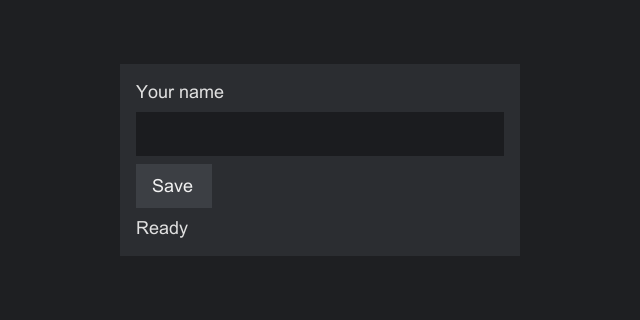
import org.inspirenxe.strata.api.ComponentFactory;
import org.inspirenxe.strata.api.component.Component;
import org.inspirenxe.strata.api.control.button.Button;
import org.inspirenxe.strata.api.control.display.Label;
import org.inspirenxe.strata.api.control.field.TextBox;
import org.inspirenxe.strata.api.layout.Anchor;
import org.inspirenxe.strata.api.layout.HorizontalAlignment;
import org.inspirenxe.strata.api.layout.StackPanel;
import org.inspirenxe.strata.api.layout.VerticalAlignment;
import org.inspirenxe.strata.api.screen.Screen;
import org.inspirenxe.strata.api.theme.Paint;

/**
 * A small form: a text box, a button and a status line, centered on the screen.
 */
public final class SettingsScreen implements Screen {

    @Override
    public Component<?> build(final ComponentFactory factory) {
        final Label status = factory.label("Ready");

        final TextBox name = factory.textBox().setMaxLength(32);
        name.setAlignment(HorizontalAlignment.STRETCH, VerticalAlignment.TOP);

        final Button save = factory.button("Save")
                .onEvent(Button.PRESSED, event -> status.setText("Saved " + name.text()));

        final StackPanel column = factory.stackPanel()
                .setSpacing(4)
                .setPadding(8)
                .add(factory.label("Your name"))
                .add(name)
                .add(save)
                .add(status);
        column.setWidth(200);
        column.setBackground(Paint.solid(0xFF2B2D31));
        column.setAnchor(Anchor.CENTER);

        return factory.anchorPanel().add(column).setAnchor(Anchor.FILL);
    }
}
What you get
- Two-pass layout (measure, then arrange) with six containers:
AnchorPanel,StackPanel,GridPanel,WrapPanel,AbsolutePanelandScrollPanel, plus aSpacer. Children can be weighted, spread, spanned across cells, ordered by z index, and lined up by the baseline of their text. Screens mirror for right to left languages. - Built-in controls: labels with word wrapping, images, buttons and toggle buttons, checkboxes, sliders, text boxes and text areas with selection, undo and the clipboard, lists, tables, trees, grids, combo boxes, menus, tabs, date and time pickers, windows and message boxes. The password box keeps its text out of events, snapshots and the clipboard.
- Click counting, dragging, hover, keyboard focus and tab order, handled the same way on every engine. Drag and drop carries text, files and your own data between controls, and in from other applications where the engine allows it.
- Commands with shortcuts that a button, a menu item and a toolbar share, mnemonics, default and cancel buttons, and context menus.
- Popups, modal dialogs, toasts and tooltips, drawn in layers above the screen.
- Screens opened the same way on every engine, with
Strata.screens().open(screen), and screens opened above others. - Typed events with priorities and bubbling to ancestors. A Pre event can be canceled, which skips the default behavior, or given another value; a Post event reports every change, whether the user or code made it.
- Lazy event snapshots, so a handler can compare a component's state at the moment an event fired with its state now.
- Data binding that keeps a control in step with a state in your model, one way or two, with converters and validation that show an invalid field and say why.
- Themes that map style keys to colors, gradients, rounded corners, sprites and nine-slices. A missing key is reported before anything draws, along with every other missing key.
- Drawing for your own components: lines, shapes, arcs, shadows, gradients at any angle and computed pixels, on every engine, and animation of any property.
- Three ways to extend: decorate a built-in control, compose several, or write your own component or layout on the same base classes the built-ins use.
- A small SPI for engine adapters, with contract tests that hold every adapter to the same rules. An engine that draws only when asked can render on demand.
- A test kit that opens your screens without a window, finds components, clicks and types, and advances the clock.
Where to start
- Installation: requirements, the Maven setup, adding Strata to a Swing app, and building from source.
- Your first screen: a step-by-step walk through the screen above, run in a Swing window.
- Core concepts: the handful of ideas everything else builds on.
- Guides: components, layout, controls, overlays, events, binding, commands, screens, threading, themes, text, animation, drag and drop, testing and extending, each in depth.
- Platforms: the Swing, Vulkan and Minecraft adapters, how engines differ, and how to write an adapter of your own.
- Minecraft: Strata screens in mods on NeoForge, Forge, Fabric and SpongeVanilla, in vanilla's look and following resource packs.
- FAQ and Troubleshooting: short answers to common questions, and fixes for common errors.
Project status
Strata is at version 0.1.0 and has not been released. The API will still change. Status and limitations lists what works, what is untested and what is not supported.
Strata is released under the Apache License, Version 2.0.