Your first screen
This page builds the form below, then shows it in a Swing window and in Minecraft. It assumes you have installed Strata.
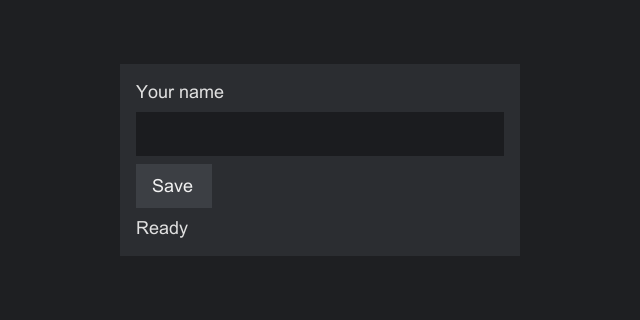
The whole thing
import org.inspirenxe.strata.api.ComponentFactory;
import org.inspirenxe.strata.api.component.Component;
import org.inspirenxe.strata.api.control.button.Button;
import org.inspirenxe.strata.api.control.display.Label;
import org.inspirenxe.strata.api.control.field.TextBox;
import org.inspirenxe.strata.api.layout.Anchor;
import org.inspirenxe.strata.api.layout.HorizontalAlignment;
import org.inspirenxe.strata.api.layout.StackPanel;
import org.inspirenxe.strata.api.layout.VerticalAlignment;
import org.inspirenxe.strata.api.screen.Screen;
import org.inspirenxe.strata.api.theme.Paint;

/**
 * A small form: a text box, a button and a status line, centered on the screen.
 */
public final class SettingsScreen implements Screen {

    @Override
    public Component<?> build(final ComponentFactory factory) {
        final Label status = factory.label("Ready");

        final TextBox name = factory.textBox().setMaxLength(32);
        name.setAlignment(HorizontalAlignment.STRETCH, VerticalAlignment.TOP);

        final Button save = factory.button("Save")
                .onEvent(Button.PRESSED, event -> status.setText("Saved " + name.text()));

        final StackPanel column = factory.stackPanel()
                .setSpacing(4)
                .setPadding(8)
                .add(factory.label("Your name"))
                .add(name)
                .add(save)
                .add(status);
        column.setWidth(200);
        column.setBackground(Paint.solid(0xFF2B2D31));
        column.setAnchor(Anchor.CENTER);

        return factory.anchorPanel().add(column).setAnchor(Anchor.FILL);
    }
}
Line by line
A screen is a class that builds a tree
public final class SettingsScreen implements Screen {
    @Override
    public Component<?> build(final ComponentFactory factory) {
A Screen describes one full screen of UI. You never construct components with new. The host that shows the screen calls build and passes in its ComponentFactory, and every component in the tree must come from that factory. That ties the tree to the host that shows it, which matters under plugin systems that give each plugin its own class loader, and when one application shows several hosts at once. For the same reason, Strata has no static way to get a factory.
build may be called more than once: every time the screen is opened, and again whenever the screen asks for a rebuild. Keep the data your screen shows in fields on the screen object, and make the components fresh in build. See Screens.
Controls
final Label status = factory.label("Ready");

final TextBox name = factory.textBox().setMaxLength(32);
name.setAlignment(HorizontalAlignment.STRETCH, VerticalAlignment.TOP);

final Button save = factory.button("Save")
        .onEvent(Button.PRESSED, e -> status.setText("Saved " + name.text()));
Every setter returns the component, so calls chain. setMaxLength(32) caps the text box at 32 code points. STRETCH makes the text box as wide as the slot its parent gives it. Without it, a text box keeps its default width of 120 units.
A Button.PRESSED handler runs after the button is pressed, by a left click or by Enter or Space while it has focus. Changing the label's text is all it takes to update the screen: Strata notices the change, lays the tree out again before the next frame and redraws. You never call layout or repaint yourself.
A column
final StackPanel column = factory.stackPanel()
        .setSpacing(4)
        .setPadding(8)
        .add(factory.label("Your name"))
        .add(name)
        .add(save)
        .add(status);
column.setWidth(200);
column.setBackground(Paint.solid(0xFF2B2D31));
column.setAnchor(Anchor.CENTER);
A StackPanel lays its children out top to bottom by default, with setSpacing units between them and setPadding units of space inside its edges. setWidth(200) fixes its width, so the stretched text box has a width to stretch to. Colors are ARGB ints, written 0xAARRGGBB, so 0xFF2B2D31 is an opaque dark gray. setAnchor(Anchor.CENTER) asks the parent to center the column.
The order of the calls on column does not matter. The setters store values, and layout reads them all later.
The root
The root of a screen is usually an AnchorPanel anchored with FILL, so it covers the whole host. An anchor panel gives each child the whole area and lets the child place itself, which is how CENTER on the column puts it in the middle. A root without FILL takes its natural size at the top left of the host.
Show it in Swing
public static void main(final String[] args) {
    // Swing components must be created and used on the event dispatch thread
    SwingUtilities.invokeLater(() -> {
        final SwingPlatform platform = new SwingPlatform(SwingTextMetrics.defaults());
        // 2 pixels per UI unit
        final StrataPanel panel = new StrataPanel(platform, Themes.flat(), 2f);
        // Strata.screens() opens screens on the default panel
        panel.setDefault();
        Strata.screens().open(new SettingsScreen());

        final JFrame frame = new JFrame("Settings");
        frame.setContentPane(panel);
        // The close button asks the screens first, and the title follows the top screen's
        panel.manageWindow(frame);
        // The size comes from what the top screen asks for
        frame.pack();
        frame.setLocationRelativeTo(null);
        frame.setVisible(true);
        panel.requestFocusInWindow();
    });
}
StrataPanel is an ordinary JPanel that holds a stack of screens. Its last constructor argument is the scale: the number of pixels per UI unit. At a scale of 2, the 200-unit column is 400 pixels wide. Swing objects must be used on the event dispatch thread, hence invokeLater.
setDefault() makes the panel the place where Strata.screens() opens screens. Strata.screens().open(screen) is how a screen is opened on every engine, so the line that opens it stays the same when the screen moves to another adapter.
To get a PNG instead of a window, for example in a test or on a build server, use SwingSnapshot:
// 640 by 400 pixels at 2 pixels per unit: the screen is laid out in 320 by 200 units
final BufferedImage image = SwingSnapshot.render(new SettingsScreen(), Themes.flat(), 640, 400, 2f);
ImageIO.write(image, "png", new File("settings.png"));
Show it in Minecraft
In a mod, the same class opens with the same line, from whatever triggers your UI, such as a key mapping, a command or a packet:
The Minecraft adapter shows it in a vanilla Screen, drawn with vanilla's sprites and font and following the player's resource packs, and the call works from any thread. Strata's Screen and Component share their simple names with vanilla's, so keep Strata screens in classes of their own. Screens on Minecraft covers the rest, and Minecraft setup the dependencies for each loader.
Next steps
- Core concepts explains the model behind what you just wrote.
- Layout covers every container and how sizes are decided.
- Events covers
onEventin depth: vetoing with Pre events, reacting with Post events, priorities and bubbling. - Platforms covers the adapters and how engines differ, and Minecraft everything specific to mods.